If you don’t like the idea of anyone being able to search you on Instagram, this article is what will help you. The steps to follow are very simple and it can be of great help to learn how to hide the Instagram account from the search. Instagram is a social media platform used to share photos, videos, and stories. You can watch longer videos on IGTV which is quite new to share lengthy videos by creating your channel over your account.
A lot of us have been lately using Instagram for chatting with our friends, this feature has been upgraded timely and lets you make video calls too.
For many, Instagram is a place where they love to spend most timesharing memes with their friend circle. Instagram is used by 1 billion users every month, and it is one of the most popular social media apps in recent times. Now since everyone is heading to Instagram, the first step is they want to add as many people they know. It may not be in interest for all the Instagram users, as you are not interested in showing your Instagram account to everyone.
Also Read:-
How To Mass Unfollow on InstagramEvery once in a while, we bump up into some Instagram accounts that we wish to 'no longer follow'. While...
It’s quite easy to search for a person and go to their Instagram account. All you have to know is their name and type it in your Instagram search bar and there you can browse through the profiles.
Now if you have set your account on private mode then it’s still better than an account on Public mode. Instagram account with the Public mode lets access to everyone on Instagram to go through your posts and stories as well as your IGTV videos. Now still if you don’t want to make it so easy for people to reach your Instagram account, you can use the given strategy to hide your Instagram.
1. Remove Linked Accounts
First, you might want to know that your Instagram account has a setting which lets you link your account with other social media platforms such as Facebook, Twitter, Tumblr, Ameba and Ok.ru. If you are used to sharing your posts from Instagram to Facebook, Twitter or Tumblr then you already know this. Now what you are not aware of is that the link is making you more visible to people you are friends with on these platforms.
So what happens is whenever a user creates a new account, they automatically see some Instagram accounts in the list as a possible friend they need to follow here.
Let’s learn how to remove the linked accounts from the Instagram account.
Step 1: Launch Instagram app on your phone, Go to your Profile by tapping in the right bottom corner of your home page.
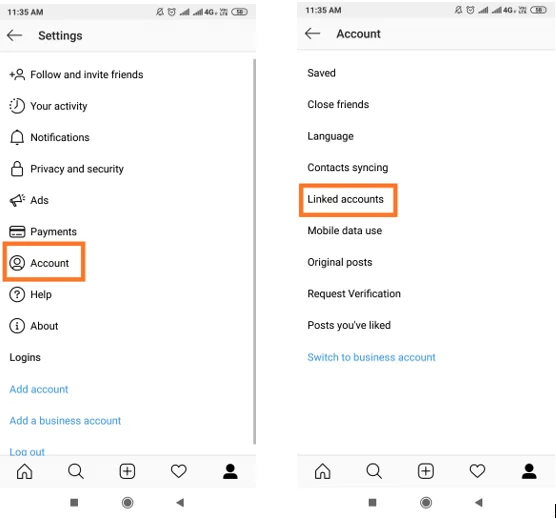
Step 2: Go to Top right corner and tap for more options, this opens up a panel from the right and you can go to Settings shown at the bottom of it.
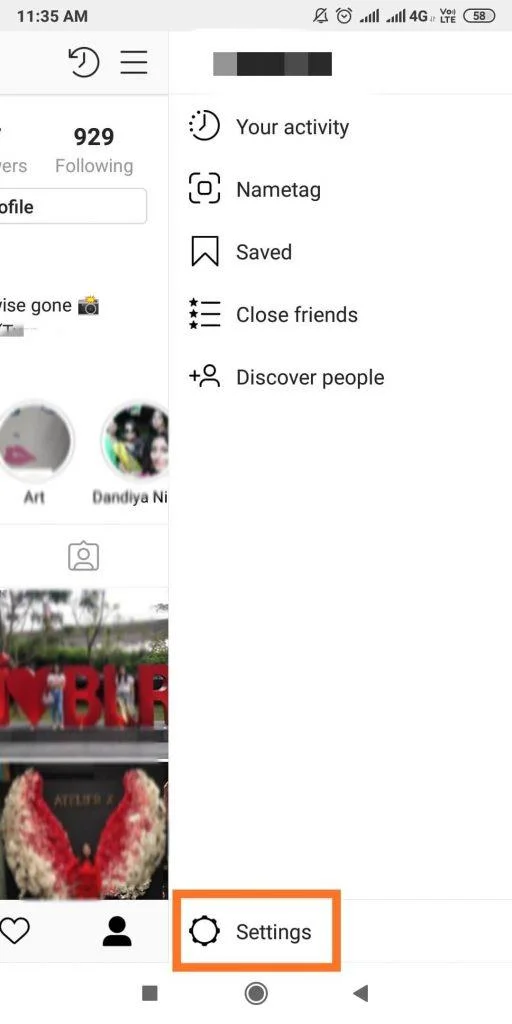
Step 3: In the given options choose Account and there you can see the Linked accounts option.

Step 4: Here you can see all your social media accounts linked to your Instagram account.
Click on each one of them and tap on Unlink Account for removing these linked accounts from the Instagram account.
Also Read:-
How & Where To Buy Instagram Followers?In a hurry and want to find an ultimate way to grow your Instagram followers? How about buying them? Having...
2. Remove Phone Number:
When we create a new Instagram account, it shows us the people who are already on Instagram. This is done with the help of your Contact list as we give permission to Instagram for its access. While it is good for some and not so much for others like the ones who want to hide the Instagram accounts. Now you need to remove the phone number from your account to disable the feature.
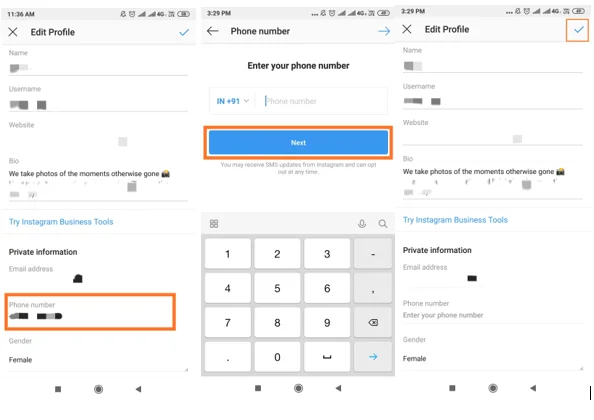
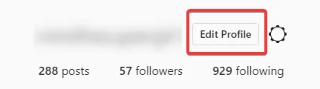
Step 1: Launch the app on your phone, go to Profile. Click Edit Profile.

Step 2: Under the section Private information you can see your Phone number, you need to click on it and delete your number by clicking backspace. Now tap on Next and make sure to save the changes by tapping on the Right mark in front of Edit Profile.

Or
You can change it to a secondary number if you use any. This will limit your visibility as the number used on the Instagram account won’t be the same with people.
Also Read:-
 How To See Who Viewed My Instagram ProfileThis is one of the biggest questions that users ask, if they can see ‘who viewed their Instagram profile’. Unfortunately,...
3. Remove Account Suggestions
As you might have noticed, a lot of Instagram profile suggestions keep showing up in the feed on the home page. Now it is based on the accounts we follow and the ones which are following us. You can change this by going to settings of your Instagram account. This change is made possible only by using the Web browser of Instagram.
Step1: Open a web browser and go to the website Instagram and log into your account.

Step2: Here go to the Profile on the right corner.
And click Edit Profile.
Step3: The last option shows the Similar Account Suggestions, uncheck this and click on Submit.
Try applying all of the above changes on your Instagram account to hide your profile from people.
As an additional trick, you can always change your username to something else other than your name. It will most definitely keep people from reaching to you as usually they would be searching by your name.
Conclusion:
It is not possible to stay on Instagram and make yourself invisible at the same time, but you can always be smart enough to hide your Instagram account from the eyes.
Just try to make these few changes in your Settings and make your Instagram account not so easy to locate for everyone. If you don’t want people to be going through your posts, make your account private. You can also stop specific Instagram accounts from finding you by going to their profile and blocking them.
Bitte teilen Sie uns in Kommentaren mit, ob Sie andere Methoden kennen, um Ihr Konto auf Instagram zu verbergen.