CO2 Regulator Bubble Counter Not Working: Setup

Fix an aquarium co2 regulator bubble counter that stays still, empties, or bubbles unevenly. Check assembly, leaks, pressure, tubing, and safe CO2 flow.
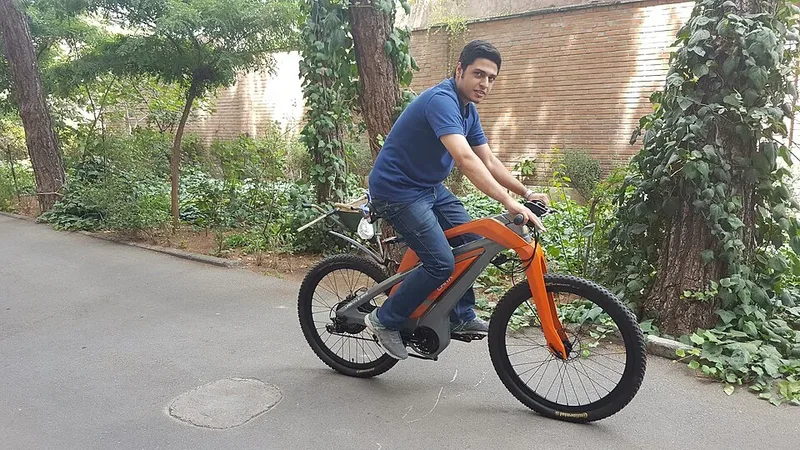
If your Bafang display shows error 08, the motor may cut out, fail to assist, or run unevenly. bafang error code 08 commonly points to a motor hall-sensor signal problem, often caused by a loose, damaged, or poorly connected motor cable.
Hall sensors inside the motor report rotor position to the controller so it can time power delivery. A broken signal path can trigger the error, but the precise definition and diagnostic procedure can vary by Bafang system and display. Check the manual for your exact model before replacing parts.
Note the display model, motor label, and when the fault appears: at startup, under load, or after hitting a bump. Find the matching Bafang display and motor manual using the model labels, then confirm what error 08 means for that system. A code that appears only while riding can point to an intermittent connection; a persistent code at startup needs the same cable checks before you conclude a sensor has failed.
Switch off the bike and remove the battery if the manual permits. Locate the motor-to-controller cable connection, usually near the motor or frame junction; do not confuse it with the display or battery plug. Align the arrows or keyed shapes, disconnect and reconnect without twisting the wires, and make sure the plug seats fully. Restore power and test briefly in a safe area; if the error clears and assistance is smooth, a poor connection was likely the cause.
With power off, inspect the full visible cable run for cuts, crushed sections, sharp bends, or rubbing near the crank, chainring, rear wheel, and frame. Check the connector for moisture, dirt, corrosion, bent pins, or a pushed-back contact. Do not probe powered pins or force a bent pin straight. If the connector is wet, let it dry fully before reconnecting; if a pin or wire is damaged, arrange a compatible cable or professional repair. A visible defect that matches the fault location is strong evidence of a cable-side problem.
With the bike stationary and the wheel safely clear of the ground, power on and observe the display while gently moving only the accessible cable near each connector. Keep hands, clothing, and tools clear of the wheel and drivetrain; do not pull the cable or ride while testing it. If the code appears or disappears as the cable moves, stop using the bike and repair the connector or cable. A repeatable change strongly suggests an intermittent connection rather than a setting.
Check that the wheel turns freely and that the motor cable is not trapped or stretched after a wheel removal or repair. Confirm the battery is seated and the display-to-controller connections are secure, following the model manual. These checks do not prove the hall sensor is good, but can expose a disturbed connection or mechanical issue. If the error remains after reconnecting and inspecting the motor cable, do not try random display settings or a generic reset sequence; use the manual’s model-specific procedure.
If the cable looks sound and the error persists, a technician can test the hall-sensor signals and controller input using the correct service information and equipment. The motor may need to be opened to inspect internal wiring or sensors, and the controller may need separate diagnosis. A confirmed missing or inconsistent sensor signal narrows the fault to the sensor, its internal connection, wiring, or controller; it does not by itself identify which part to replace. Avoid opening a sealed motor or controller unless you have the required tools and repair experience.
| Possible cause | Typical symptom | Quick test |
|---|---|---|
| Loose motor connector | Fault after a bump or recent service | Power off, reseat, then retest |
| Damaged cable or pin | Fault changes with cable movement | Inspect the cable and connector while powered off |
| Internal hall sensor or wiring | Persistent error despite sound external connections | Have a technician test the sensor circuit |
| Controller input | Fault remains with the motor connection checked | Professional controller and motor diagnosis |
On many Bafang systems, error 08 is associated with a motor hall-sensor signal issue. The exact meaning can depend on the motor, display, and system, so confirm it in the manual for your model.
Avoid riding if the motor cuts out, surges, or behaves unpredictably. Stop, switch off, and inspect the external cable connections; have the bike serviced if the error persists.
No. A loose connector or damaged cable may cause the same warning, and a controller input can also be involved. Diagnose the external wiring and test the sensor circuit before replacing the motor.
Start with the motor connector and visible cable because those checks are simple and often reveal the cause. If the warning remains, share the display and motor model labels and your inspection results with a Bafang-capable technician for a sensor and controller diagnosis.
Photo: Freshman404 / CC BY-SA 4.0 (Wikimedia Commons)
Fix an aquarium co2 regulator bubble counter that stays still, empties, or bubbles unevenly. Check assembly, leaks, pressure, tubing, and safe CO2 flow.
Fix an aquarium ato float switch stuck by checking buildup, movement, wiring, and controller status, then add safe ATO limits to reduce overflow risk.
Fix reef tank dosing pump calibration with a measured three-point check, tubing inspection, priming, controller steps, and a safe verification run.
Fix apex controller not connecting to wifi by checking AquaBus communication, network compatibility, signal, and Fusion status with practical steps you can try today.
Fix tractive not charging red light issues by checking the charger, contacts, power source, and battery condition, with practical tests to identify the cause.
Fix a tractive tracker not connected to network issue by checking coverage, charging, SIM status, and LTE compatibility before contacting Tractive support.
Fix a petlibro feeder not dispensing by checking food flow, portion settings, the motor, and app connection, with safe steps to confirm the cause.
Fix a Petlibro feeder camera icon that keeps flashing: check Wi-Fi, power, app status, and setup steps to bring the camera back online today.
Petlibro feeder won t connect to wifi? Check your model’s Wi-Fi band, router settings, app permissions, and pairing mode with these practical fixes.
Fix the litter robot 4 pinch detect error by checking the waste drawer, cleaning pinch contacts, reseating the bonnet, and safely testing the cycle.








