CO2 Regulator Bubble Counter Not Working: Setup

Fix an aquarium co2 regulator bubble counter that stays still, empties, or bubbles unevenly. Check assembly, leaks, pressure, tubing, and safe CO2 flow.
Bafang error code 21 usually means the drive system is not receiving a usable speed signal, so the display may show zero speed or the motor may stop assisting. The most common cause is a misaligned or displaced spoke magnet that no longer passes close enough to the speed sensor.
The controller estimates wheel speed from pulses sent by a sensor as a magnet rotates past it. A missing, loose, misaligned, or failed sensor signal can trigger Error 21; a damaged cable or incompatible configuration can produce a similar symptom. Exact behavior varies by Bafang system and display, so check your model’s manual before changing settings.
Switch the system off and remove the battery if your model allows it before handling connectors or the rear wheel. Keep hands, clothing, and tools clear of the wheel and drivetrain; never test the motor with the bike supported insecurely. Do not open the battery or controller enclosure.
Locate the small sensor near the rear wheel and the magnet attached to a spoke. Rotate the wheel by hand and confirm the magnet passes directly by the sensor, close enough for the sensor to detect it, without touching. If it has slipped, reposition and tighten it according to the bike or sensor instructions. A steady speed reading while turning the wheel slowly, with the error cleared, confirms the signal is being detected.
Follow the sensor wire from the rear wheel toward its connection point. Look for cuts, crushed sections, stretched cable, corrosion, or a plug that has worked loose. With power off, reseat an accessible connector by its housing; do not pull on the wires or force a keyed plug. Restore power and check whether the speed reading returns. If the cable is visibly damaged, stop riding and arrange repair.
With the bike securely stationary, turn the wheel by hand and watch the speed display. Some systems only update above a minimum rotation speed, so turn it smoothly and observe for a moment. If speed remains at zero despite the magnet passing the sensor, the fault is likely in alignment, the sensor, its wiring, or configuration. A changing speed reading points to an intermittent issue if Error 21 remains.
If the wheel, display, controller, or sensor was recently replaced, check the system’s setup using the display or service interface specified for your exact model. Look for wheel size or speed sensor configuration only if those settings are exposed; names and access paths vary, so check your model’s menu or service documentation. Do not alter controller parameters by trial and error. Correct settings followed by a plausible speed reading confirm the configuration was contributing to the fault.
After checking the physical parts, switch the system off, wait briefly, and restart it according to the owner’s manual. Raise the drive wheel securely or walk the bike in a safe open area and check whether the speed reading appears and assistance returns normally. If the error disappears only temporarily, or returns when the wheel or cable moves, suspect an intermittent connection or failing sensor rather than a lasting reset.
| Likely cause | Typical symptom | Quick test |
|---|---|---|
| Misaligned magnet | Zero or erratic speed after wheel work | Rotate wheel and watch magnet pass sensor |
| Loose or damaged cable | Signal changes when cable moves | Inspect routing and reseat accessible plug with power off |
| Sensor failure | No speed reading despite correct alignment | Verify magnet gap and cable condition, then request sensor testing |
| Configuration mismatch | Fault began after component or wheel change | Compare setup with model-specific service documentation |
A bike may still move, but speed reporting or motor assistance can be unreliable, and some systems limit or disable assistance. Avoid relying on it in traffic or on a route where assistance is needed. Fix the sensor issue before normal use.
The magnet may have moved, the sensor cable may have been disturbed, or the new wheel setup may not match the system’s configuration. Check alignment and connector seating first, with the system switched off. Then confirm any model-specific wheel settings.
Not necessarily. A shifted magnet or loose sensor connection is a simpler and more common cause to rule out first. If the sensor, wiring, alignment, and documented settings check out, have a qualified e-bike technician test the sensor input and controller.
Bafang error code 21 most often clears when the speed sensor can detect a correctly positioned wheel magnet and its signal reaches the controller. If the error persists after these checks, stop replacing parts by guesswork and contact the bike supplier or a qualified Bafang service technician with your model and the checks already completed.
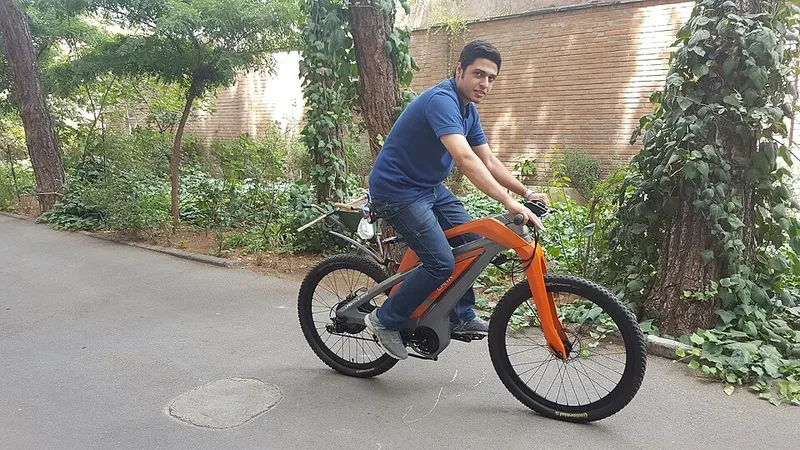
Photo: Freshman404 / CC BY-SA 4.0 (Wikimedia Commons)
Fix an aquarium co2 regulator bubble counter that stays still, empties, or bubbles unevenly. Check assembly, leaks, pressure, tubing, and safe CO2 flow.
Fix an aquarium ato float switch stuck by checking buildup, movement, wiring, and controller status, then add safe ATO limits to reduce overflow risk.
Fix reef tank dosing pump calibration with a measured three-point check, tubing inspection, priming, controller steps, and a safe verification run.
Fix apex controller not connecting to wifi by checking AquaBus communication, network compatibility, signal, and Fusion status with practical steps you can try today.
Fix tractive not charging red light issues by checking the charger, contacts, power source, and battery condition, with practical tests to identify the cause.
Fix a tractive tracker not connected to network issue by checking coverage, charging, SIM status, and LTE compatibility before contacting Tractive support.
Fix a petlibro feeder not dispensing by checking food flow, portion settings, the motor, and app connection, with safe steps to confirm the cause.
Fix a Petlibro feeder camera icon that keeps flashing: check Wi-Fi, power, app status, and setup steps to bring the camera back online today.
Petlibro feeder won t connect to wifi? Check your model’s Wi-Fi band, router settings, app permissions, and pairing mode with these practical fixes.
Fix the litter robot 4 pinch detect error by checking the waste drawer, cleaning pinch contacts, reseating the bonnet, and safely testing the cycle.








