CO2 Regulator Bubble Counter Not Working: Setup

Fix an aquarium co2 regulator bubble counter that stays still, empties, or bubbles unevenly. Check assembly, leaks, pressure, tubing, and safe CO2 flow.
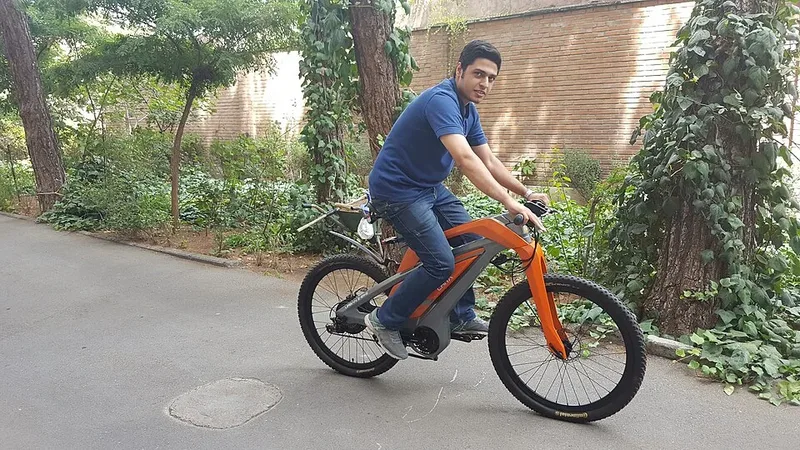
If your Rad Power display shows Error 21 and pedal assist or the throttle cuts out, the system has detected abnormal motor current. A common trigger is demanding too much from the motor, such as climbing a steep hill under heavy load; a loose or poor battery connection can also interrupt power delivery. This code is not, by itself, a torque-sensor diagnosis.
The controller monitors current flowing to the hub motor and may stop assistance when it detects an abnormal condition. On current versions and across different models, the exact diagnosis can vary, so check your model’s manual. A torque sensor measures pedal force; don’t replace one based on Error 21 alone.
Move off the road, switch the bike off, and remove the battery if your model’s manual permits it. Let the motor and controller cool before trying again, especially if the code appeared after a long climb or sustained throttle use. Restart on level ground with a light load. If the code clears and assist works normally, high motor demand or heat may have triggered it; avoid repeating the same climb and load combination.
Unload cargo or a passenger if applicable, and check that the total load is within the limit stated in your owner’s manual. With the bike on level ground, use a low assist level and pedal steadily instead of relying on the throttle. If Error 21 returns only under heavy demand, the motor may be reaching a current limit or encountering a fault under load; stop testing hard and arrange service.
Turn the bike off before removing the battery. Check that the battery and tray contacts are clean, dry, and free of obvious damage; do not scrape or bend them. Reinstall the battery fully and make sure it locks into place, then power on and test gently. A secure fit and a cleared code suggest a seating or contact issue. If a contact is burnt, loose, or corroded, do not ride until it is assessed.
With the battery removed, visually follow the cable from the rear hub motor toward the bike’s wiring harness. Look for pinching, cuts, loose plugs, moisture, bent pins, or a connector that has pulled apart. Reconnect only an accessible plug that is clearly designed to be unplugged, align its guides, and avoid pulling on the wires. A damaged cable or connector needs repair; don’t ride with exposed conductors.
Lift the wheel only if you can do so safely, then spin it by hand with the bike powered off. Check for a rubbing brake, an object caught near the wheel, or a wheel that turns unusually hard. Correct simple debris or brake alignment only if you know how and your manual supports it. A wheel that spins freely after correction may reduce motor strain; persistent drag, grinding, or a loose axle needs a bike mechanic.
Once the battery is installed and all accessible connectors are seated, switch the bike on and note whether the code appears immediately or only when assist is requested. Test briefly on flat ground, without throttle surges. If it stays clear at low demand but returns under load, stop riding and report those conditions to service. If it appears immediately, a persistent electrical or controller fault is more likely than a temporary overload.
Write down the exact model, display type, battery state, when the error appears, and any recent impact, rain exposure, or cable work. Check the owner’s manual and the current Rad support instructions for that model; don’t change undocumented display settings or open the battery, motor, or controller. If Error 21 returns after the basic checks, a technician needs to test the battery-to-controller and motor circuits before parts are replaced.
| Possible cause | Typical clue | Quick test |
|---|---|---|
| High motor demand | Appears after a steep climb or heavy load | Cool down; retry gently on level ground |
| Battery seating or contacts | Power cuts out or code follows battery handling | Power off; reseat and inspect for visible damage |
| Motor cable or connector | Code follows impact, moisture, or cable movement | Inspect accessible wiring with battery removed |
Rad’s troubleshooting guidance describes Error 21 as a problem with power going from the battery to the controller, and it may occur when the bike has been pushed hard. Manuals commonly label code 21 as abnormal motor current. Check your exact model’s documentation because labels and procedures can vary.
Not necessarily. Error 21 is associated with abnormal current or power delivery, while a torque sensor measures how hard you pedal. Diagnose the battery, motor demand, and visible wiring first, and follow the error guide for your model.
Stop riding while the error is active, particularly if assistance cuts in and out, the motor behaves unpredictably, or you notice heat, smell, or damaged wiring. After a cool-down and basic visual checks, a brief low-demand test may show whether the code clears. If it returns, arrange service before riding again.
Rad power bikes error code 21 is a current or power-path warning, so begin with cooling, load, battery seating, and a careful cable inspection. If the code remains or returns, stop riding and give a Rad service provider or qualified e-bike technician your model and the conditions that trigger it.
Photo: Freshman404 / CC BY-SA 4.0 (Wikimedia Commons)
Fix an aquarium co2 regulator bubble counter that stays still, empties, or bubbles unevenly. Check assembly, leaks, pressure, tubing, and safe CO2 flow.
Fix an aquarium ato float switch stuck by checking buildup, movement, wiring, and controller status, then add safe ATO limits to reduce overflow risk.
Fix reef tank dosing pump calibration with a measured three-point check, tubing inspection, priming, controller steps, and a safe verification run.
Fix apex controller not connecting to wifi by checking AquaBus communication, network compatibility, signal, and Fusion status with practical steps you can try today.
Fix tractive not charging red light issues by checking the charger, contacts, power source, and battery condition, with practical tests to identify the cause.
Fix a tractive tracker not connected to network issue by checking coverage, charging, SIM status, and LTE compatibility before contacting Tractive support.
Fix a petlibro feeder not dispensing by checking food flow, portion settings, the motor, and app connection, with safe steps to confirm the cause.
Fix a Petlibro feeder camera icon that keeps flashing: check Wi-Fi, power, app status, and setup steps to bring the camera back online today.
Petlibro feeder won t connect to wifi? Check your model’s Wi-Fi band, router settings, app permissions, and pairing mode with these practical fixes.
Fix the litter robot 4 pinch detect error by checking the waste drawer, cleaning pinch contacts, reseating the bonnet, and safely testing the cycle.








