ZPanel y Sentora en CentOS 6 x64
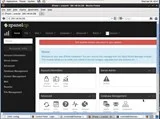
ZPanel, un panel de control de alojamiento web popular, se bifurcó en 2014 a un nuevo proyecto llamado Sentora. Aprende a instalar Sentora en tu servidor con este tutorial.
#, and ones that can be run as a regular user by $. The recommended way to run commands as root is to, as a regular user, prefix each of them with sudo.vi, vim, nano, emacs and so on.If you are using a firewall, you will need to enable incoming TCP traffic to port 80.
Install Apache:
# pacman -S apache
Start Apache, and make it start after every boot:
# systemctl enable --now httpd
Test that Apache is running. Visit http://YOUR-SERVER-WEB-ADDRESS-OR-IP, and you will see a page showing "Index of /". Run ip addr if you need to know the IP address.
Apache's configuration file is /etc/httpd/conf/httpd.conf. Although Apache is started by the root user, User http makes it immediately switch to running as this user for security reasons. DocumentRoot "/srv/http" sets where it will look for web files. CustomLog "/var/log/httpd/access_log" common sets where accesses to Apache that are successful will be logged. ErrorLog "/var/log/httpd/error_log" sets where accesses to Apache that error will be logged.
By default, if Apache is given a directory that it does not find an index file with an extension it's configured to use, it will automatically generate an index showing the directory's contents. This can be considered a security vulnerability. To disable it, edit /etc/httpd/conf/httpd.conf and within <Directory "/srv/http">, from Options, delete Indexes. Once restarted, Apache will give an "Access forbidden!" error message, unless a file like /srv/http/index.html exists.
Restart Apache:
# systemctl restart httpd
By default, a user's ~/public_html/ directory will be shown at http://YOUR-SERVER-WEB-ADDRESS-OR-IP/~USERNAME/. But, the user http must have executable bit access to the user directory and its public_html directory:
$ mkdir ~/public_html
$ chmod o+x ~/
$ chmod o+x ~/public_html
Additionally, the user http must have read access to individual files. If necessary, run the following command:
$ chmod o+r ~/public_html/<FILES>
If you want to disable user's public_html directories from being on your web server, regardless of directory and file permissions, comment this line (add # to the beginning) in /etc/httpd/conf/httpd.conf:
Include conf/extra/httpd-userdir.conf
Restart Apache:
# systemctl restart httpd
You can host multiple domain names from the same Apache server, and serve them different content.
Create a folder to hold your virtual host configurations:
# mkdir /etc/httpd/conf/vhosts
Create a configuration file for each virtual host, such as /etc/httpd/conf/vhosts/YOUR-DOMAIN-NAME.com:
<VirtualHost *:80>
    ServerAdmin webmaster@YOUR-DOMAIN-NAME.com
    DocumentRoot "/srv/YOUR-DOMAIN-NAME.com"
    ServerName YOUR-DOMAIN-NAME.com
    ServerAlias YOUR-DOMAIN-NAME.com
    ErrorLog "/var/log/httpd/YOUR-DOMAIN-NAME.com-error_log"
    CustomLog "/var/log/httpd/YOUR-DOMAIN-NAME.com-access_log" common

    <Directory "/srv/YOUR-DOMAIN-NAME.com">
        Require all granted
    </Directory>
</VirtualHost>
Make the virtual host serving directory:
# mkdir /srv/YOUR-DOMAIN-NAME.com
At the end of /etc/httpd/conf/httpd.conf, include each of these virtual host configuration files:
Include conf/vhosts/YOUR-DOMAIN-NAME.com
Restart Apache:
# systemctl restart httpd
Requests Apache receives to YOUR-DOMAIN-NAME.com will be served out of /srv/YOUR-DOMAIN-NAME.com. Note requests to Apache not matching a specific ServerName or ServerAlias, just the IP address, or another domain name resolving to your IP, will still be served out of the first virtual host that is included. That said, you should still consider anything in the general DocumentRoot, which defaults to /srv/http, to be somehow accessible.
ZPanel, un panel de control de alojamiento web popular, se bifurcó en 2014 a un nuevo proyecto llamado Sentora. Aprende a instalar Sentora en tu servidor con este tutorial.
Aprende cómo instalar Vtiger CRM, una aplicación de gestión de relaciones con el cliente, en CentOS 7 para aumentar tus ventas y mejorar el servicio al cliente.
Esta guía completa le mostrará cómo configurar un servidor Counter-Strike 1.6 en Linux, optimizando el rendimiento y la seguridad para el mejor juego. Aprende los pasos más recientes aquí.
Los ataques de ransomware van en aumento, pero ¿puede la IA ayudar a lidiar con el último virus informático? ¿Es la IA la respuesta? Lea aquí, sepa que la IA es una bendición o una perdición
ReactOS, un sistema operativo de código abierto y gratuito, está aquí con la última versión. ¿Puede satisfacer las necesidades de los usuarios de Windows de hoy en día y acabar con Microsoft? Averigüemos más sobre este estilo antiguo, pero una experiencia de sistema operativo más nueva.
Whatsapp finalmente lanzó la aplicación de escritorio para usuarios de Mac y Windows. Ahora puede acceder a Whatsapp desde Windows o Mac fácilmente. Disponible para Windows 8+ y Mac OS 10.9+
Lea esto para saber cómo la Inteligencia Artificial se está volviendo popular entre las empresas de pequeña escala y cómo está aumentando las probabilidades de hacerlas crecer y dar ventaja a sus competidores.
Recientemente, Apple lanzó macOS Catalina 10.15.4, una actualización complementaria para solucionar problemas, pero parece que la actualización está causando más problemas que conducen al bloqueo de las máquinas Mac. Lee este artículo para obtener más información
13 Herramientas comerciales de extracción de datos de Big Data
Nuestra computadora almacena todos los datos de una manera organizada conocida como sistema de archivos de diario. Es un método eficiente que permite a la computadora buscar y mostrar archivos tan pronto como presiona buscar.