Home
» News
»
AMD Radeon: What to Know About the Latest Graphics Cards and Updates
AMD Radeon: What to Know About the Latest Graphics Cards and Updates
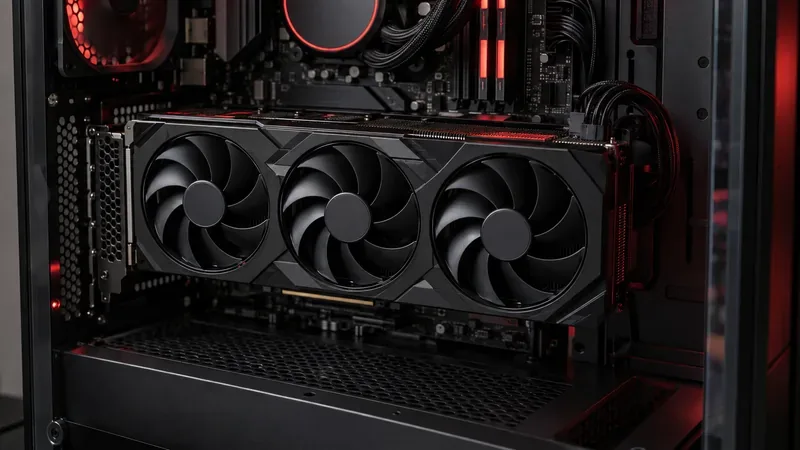
A modern triple-fan graphics card installed in a desktop PC, illustrating the hardware buyers compare when choosing a Radeon upgrade.
The latest Radeon update is a driver release, not a new flagship launch
As of September 20, 2026, AMD’s newest Windows release notes I could verify are for the optional AMD Software: Adrenalin Edition 26.9.1 driver, dated September 3. It adds support for Onimusha: Way of the Sword and The Blood of Dawnwalker, and lists a fix for intermittent crashes in Starfield and Apex Legends on Radeon RX 9000 graphics cards. That is useful news for owners of affected systems, but a driver update does not by itself mean a new GPU generation has launched. Read the official Adrenalin 26.9.1 release notes before installing; AMD also records known issues there.
The same release notes say Smart Access Memory may become disabled after installing the driver on Windows 10 systems. They also flag a 4 GB memory limitation for the Radeon RX 9050 in Cyberpunk 2077, recommending lower or disabled graphics-intensive settings if problems occur. These caveats matter more to some readers than the headline feature list: if your current games run well, an optional update may not be urgent; if you own an RX 9000 card and play one of the named games, check whether the fix applies to your setup.
What is current in the Radeon lineup?
AMD’s current desktop gaming generation is Radeon RX 9000, built on the RDNA 4 architecture. The range includes higher-tier RX 9070 models, mainstream RX 9060 XT cards, and the newer RX 9050 4GB listed in AMD’s driver and product materials. RX 9060 XT is sold in both 8 GB and 16 GB versions, so the model name alone is not enough to compare two listings. The product range and board availability vary by region; U.S. buyers should confirm the exact card, memory configuration, and seller stock before deciding.
Older RX 7000 and RX 6000 cards can still be relevant, especially when a discounted previous-generation card meets your performance target. AMD’s 26.9.1 compatibility list includes a selection of RX 9000, RX 7000, RX 6000, and RX 5000 desktop families. That provides a current driver reference, though compatibility today is not a promise of unlimited future support.
Card group
Who should consider it
What to check
Radeon RX 9070 XT
Buyers aiming for high settings, high refresh rates, or demanding 1440p and 4K play.
Compare real game benchmarks, card dimensions, cooling, power connectors, and PSU requirements for the exact partner model.
Radeon RX 9070
People seeking a high-end option who do not need the XT version’s top position in the range.
Compare its current price with the XT and with competing cards using the games and resolution you actually play.
Radeon RX 9060 XT, 8 GB or 16 GB
Mainstream builds focused on 1080p or 1440p, depending on settings and the game.
Check the memory capacity in the listing. The 8 GB and 16 GB cards are not interchangeable for every workload or budget.
Radeon RX 9050, 4 GB
Budget systems, lighter games, or buyers with modest settings and expectations.
Four gigabytes can constrain texture-heavy newer games. AMD’s own release notes call out a Cyberpunk 2077 setting adjustment for this card.
RX 7000 / RX 6000 and earlier
Value-focused shoppers considering a sale or used card.
Check the exact driver page, warranty, condition, power use, and benchmarks for your games before buying.
How to choose a Radeon card for your PC
Start with your screen and games
Write down your monitor resolution, refresh rate, and a short list of games. A card intended for competitive 1080p play has different priorities from one expected to run visually demanding single-player games at 4K. Look for independent tests at the same resolution and quality settings you plan to use, and compare several games rather than relying on one average. Frame rates vary with the processor, game patches, drivers, and graphics settings, so a manufacturer’s benchmark is a reference for its stated test setup, not a guarantee for every PC.
Read the memory capacity and power details
Video memory (VRAM) stores textures and other graphics data. More VRAM does not automatically make a card faster, but insufficient capacity can force lower settings or cause trouble in demanding games. The RX 9060 XT’s 8 GB and 16 GB versions are a clear example of why buyers should verify the full product name. The RX 9050’s 4 GB limitation is especially relevant if you expect to play new releases at high texture quality.
Next, check the exact card’s length, thickness, power connectors, and AMD’s recommended power supply. Board partners can use different coolers, factory settings, and dimensions under the same GPU name. Make sure your case has clearance and your power supply has the required connectors before ordering. AMD’s official graphics specifications are a useful starting point; check the chosen board maker’s own page for that model’s physical details.
Compare street prices, not only model numbers
Retail prices and stock change, and AMD notes that availability depends on region. Compare the total price of the specific partner cards you can actually buy, including warranty and return terms. A discounted older Radeon may make sense if it passes your game and power checks. A newer model may be a better long-term choice if its added memory or features matter to your planned use. There is no universal best Radeon card without a budget, resolution, and workload.
What do Adrenalin, FSR, and HYPR-RX do?
AMD Software: Adrenalin Edition is the driver and settings application for supported Radeon hardware. AMD FidelityFX Super Resolution (FSR) is a family of game technologies that can reconstruct a higher-resolution image or generate frames where a game supports the relevant feature. HYPR-RX can combine supported Radeon features, but what is available depends on the GPU, driver, and game. These technologies can improve perceived smoothness or performance in compatible titles; they do not guarantee the same image quality or frame-rate gain in every game. Check the game’s own graphics menu and AMD’s FSR technology page for current compatibility information.
Should you install Adrenalin 26.9.1?
Consider updating if you use a supported Radeon card and want the named game support or the Starfield/Apex crash fix.
Read the notes first if your PC relies on Smart Access Memory in Windows 10, uses an RX 9050, or depends on a feature that may be affected by the listed known issues.
Use your laptop maker’s driver guidance on a notebook or all-in-one PC. AMD says its notebook reference package has limited support for system-vendor-specific features and recommends the OEM’s customized driver when compatibility issues arise.
Do not treat optional as mandatory. If the current driver is stable and the update brings no relevant fix or game support, waiting for another release is a reasonable choice.
For a desktop upgrade, the dependable buying process is simple: identify your target resolution and games, compare the exact VRAM variant, confirm case and power compatibility, then check current prices and benchmark results. For a driver update, use AMD’s official product support page or the PC maker’s support page and review the release notes for your hardware. As of September 20, 2026, 26.9.1 is the recent verified software update; it is a meaningful maintenance release, while the RX 9000 family remains the current Radeon desktop generation covered here.