Home
» News
»
Samsung One UI 9: Features, Eligible Galaxy Devices and Rollout Timing
Samsung One UI 9: Features, Eligible Galaxy Devices and Rollout Timing
One UI 9 is no longer just an upcoming Samsung update. As of September 2026, Samsung has started the official rollout, beginning with the Galaxy S26 series after One UI 9 first shipped on the Galaxy Z Fold8 Ultra, Galaxy Z Fold8 and Galaxy Z Flip8. Samsung says the software is built on Android 17 and will expand gradually to more Galaxy devices.
For someone new to Samsung updates, the important distinction is simple: One UI is Samsung’s software interface layered on top of Android. A major One UI release can change how menus look, add Samsung-specific features, improve Galaxy AI tools and bring new privacy or accessibility controls. The Android version underneath matters because Samsung’s eligibility promises are generally expressed in generations of Android operating-system upgrades.
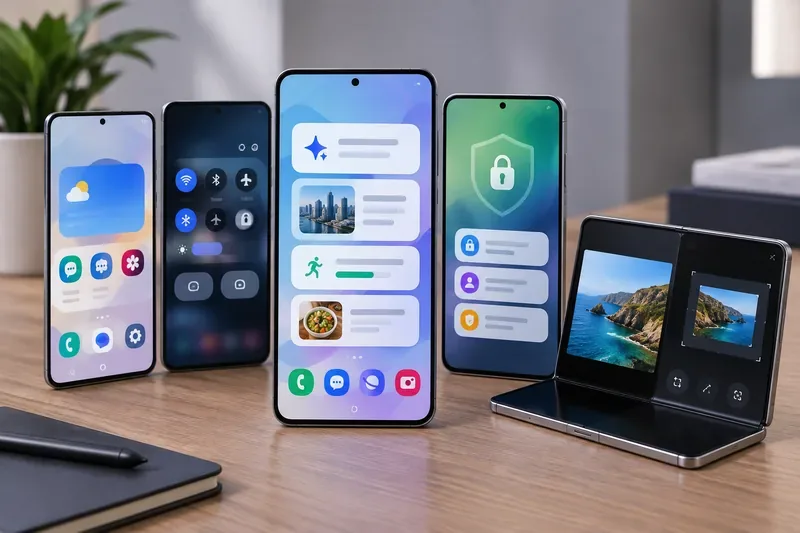
One UI 9 spans phones and foldables, with changes centered on personalization, contextual assistance, security, creative tools and device management.
What you need to know first
Samsung officially announced the One UI 9 beta in May 2026 and said it was built on Android 17. The stable version later debuted on Samsung’s newest foldables, followed by a wider rollout beginning September 16 with the Galaxy S26, S26+ and S26 Ultra. Samsung’s official rollout announcement says additional Galaxy devices will receive the update gradually.
That last word matters. Samsung does not push a major update to every model, carrier and country on the same day. Even two owners of the same phone may see different installation dates if they use different carriers or live in different markets. Samsung also notes that individual One UI 9 features can vary by model, region, language and service availability.
One UI 9 features that are confirmed
Many early articles about One UI 9 focused on rumors. At this point, several features are official. Samsung’s current One UI 9 overview and Newsroom announcements describe a mixture of interface refinements, Galaxy AI features, productivity tools and security improvements.
My FanCam
My FanCam can track a person you select in a recorded video and automatically reframe the footage to keep that subject centered. Samsung positions it as a way to reduce manual editing when you want to turn a performance, sports clip or other moving scene into a shareable video. Samsung says a Samsung Account is required and cautions that results can vary by video.
More customizable Now Brief cards
Now Brief is Samsung’s personalized summary surface that collects selected information into a daily briefing. In One UI 9, Samsung adds generative and editable cards so users can tailor categories such as wellness, weather and video. This is a good example of a One UI 9 feature that may not behave identically on every Galaxy device because Samsung ties some Galaxy AI functions to specific models, apps, regions and account requirements.
Now Nudge
Now Nudge provides context-aware prompts that suggest a useful next action based on what you are doing. Samsung gives examples such as pulling up reservation information or saving a location while you are already in a conversation. The goal is to reduce the need to leave one app, search manually and return later.
Quick Panel customization
The One UI 9 beta introduced more control over the Quick Panel, which is the pull-down area for settings such as Wi-Fi, Bluetooth, brightness and media controls. Samsung says brightness, sound and media sections can be adjusted independently, with additional sizing and layout options.
Creative and productivity improvements
Samsung Notes gains new decorative tapes and more pen styles. Creative Studio can surface image-generation suggestions around relevant events. Interpreter adds a Thread View so you can review earlier parts of a translated conversation, while Document Scan is designed to handle difficult source material such as curved pages and folded corners with less manual correction. Voice Recorder summaries can also use clearer structures such as headings and tables.
Accessibility changes
Samsung has highlighted an adjustable Mouse Keys speed, a combined TalkBack package and Text Spotlight. TalkBack is a screen-reader system that speaks interface content for users who need audio navigation. Text Spotlight enlarges or clarifies selected text in a floating view to make reading easier.
Security Brief and Privacy Alerts
Security Brief can bring malware warnings, unknown-source app alerts and permission concerns into Now Brief. Privacy Alerts use on-device AI to flag behavior that may deserve attention, such as unnecessary background permission access. Samsung also says One UI 9 can block newly identified high-risk apps under updated security policies and recommend deletion.
Warranty and Care in Settings
On supported devices and in supported regions, One UI 9 can bring warranty status, self-diagnostics, repair estimates, Samsung Care+ management and service booking closer to the Settings app. Availability varies by country and device, so do not assume every option shown in Samsung promotional material will appear on your phone.
Which Galaxy devices are eligible for One UI 9?
Samsung has not published one universal, final worldwide list covering every phone and tablet that will receive One UI 9. The safest way to read eligibility is to separate confirmed rollout devices from models that are expected to qualify under Samsung’s published OS-upgrade commitments.
Status
Galaxy devices
What that means
Shipped with One UI 9
Galaxy Z Fold8 Ultra, Galaxy Z Fold8, Galaxy Z Flip8, Galaxy S26 FE
These devices launched with One UI 9 rather than waiting for a later major update.
Official rollout started
Galaxy S26, Galaxy S26+, Galaxy S26 Ultra
Samsung announced the stable rollout starting September 16, 2026.
Strongly expected from official support commitments
Galaxy S25 family, Galaxy S24 family, Galaxy S23 family; Galaxy Z Fold7/Flip7, Fold6/Flip6, Fold5/Flip5; Galaxy Tab S9 family and newer supported Tab S models
These generations remain within Samsung’s published major-OS support windows. Exact rollout dates can still differ.
Expected among supported A-series models
Examples include Galaxy A54 5G and A34 5G, plus newer long-support A-series models
Samsung promised the A54 and A34 up to four OS generations, which reaches Android 17. Newer A-series phones may have even longer support policies.
The support-window logic is important for older devices. The Galaxy S23 series launched on Android 13 and was promised four generations of OS upgrades, which can carry it through Android 17. The Galaxy S24 series moved to an even longer policy: Samsung promised seven generations of OS upgrades. You can verify that policy in Samsung’s Galaxy S24 launch announcement.
For midrange phones, the policy differs by generation. Samsung specifically said the Galaxy A54 5G and A34 5G receive up to four OS generations in its official A54/A34 announcement. The newer A56, A36 and A26 generation moved to up to six generations of Android OS and One UI upgrades.
Do not treat feature support as identical to update eligibility. A phone may receive One UI 9 but lack a specific AI feature because of hardware, regional or service requirements. Samsung’s own One UI pages repeatedly note this limitation.
Release timing: when should you expect the update?
The rollout is already underway, but Samsung has not given one single worldwide completion date. The useful timeline is:
May 2026: One UI 9 beta began on the Galaxy S26 series in selected markets. Samsung confirmed that the software was based on Android 17 in its beta announcement.
Mid-2026: One UI 9 debuted commercially on Samsung’s newest Galaxy Z foldables.
September 16, 2026: Samsung began the broader stable rollout with the Galaxy S26 series.
After that: additional supported Galaxy phones and tablets are expected to receive One UI 9 in stages, with schedules varying by model, carrier and country.
For U.S. users, the most reliable place to check is Samsung’s own support flow rather than a rumored calendar. Samsung’s One UI 9 upgrade guide instructs users to open Settings, go to Software Update and check for available updates.
How to prepare before One UI 9 reaches your phone
You do not need to do anything complicated, but a few checks make the process smoother.
Confirm your exact model. Open Settings and look under About phone or About tablet. “Galaxy S24” and “Galaxy S24 FE,” for example, are different models and may have different rollout timing.
Install pending updates first. Keeping your current software reasonably up to date can reduce confusion when the major update arrives.
Back up important data. Major updates are designed to preserve your files, but a current backup is still sensible before any large operating-system change.
Keep enough free storage. Large system packages need room to download, unpack and install. If storage is nearly full, remove unneeded downloads or move photos before starting.
Use a reliable connection and sufficient battery power. Avoid beginning a major update when the phone is about to run out of power or when your network is unstable.
How to check for One UI 9
On supported Galaxy devices, go to Settings > Software Update and use the option to check for updates. The wording can vary slightly by device and software build. If One UI 9 is not offered, that does not automatically mean your phone is ineligible; the update may simply not have reached your carrier or region yet.
You can also use Samsung Members for device-specific notices. Samsung’s official One UI information says Samsung Members can be used to check compatibility and update-release information where available.
Mistakes to avoid
Do not assume every online “eligible device list” is official. Many lists combine support-policy calculations with leaks. Use Samsung’s own support commitments as the baseline.
Do not assume every One UI 9 feature will come to every eligible phone. Galaxy AI functions, Privacy Alerts and service tools can have separate hardware, language, account and regional requirements.
Do not install unofficial firmware just to get the update sooner. Waiting for your normal Samsung or carrier release is the safer route for most users.
Do not compare rollout dates across countries as if they are universal. Carrier certification and regional scheduling can move dates by days or weeks.
Bottom line
One UI 9 is an active stable release, not merely an expected future version. Samsung has confirmed Android 17 as its foundation, introduced features such as My FanCam, customizable Now Brief cards, Now Nudge, Quick Panel changes, improved scanning and translation, accessibility upgrades, and new security tools, and begun the broader rollout with the Galaxy S26 family.
If you own a recent flagship Galaxy device, especially an S23 or newer S-series phone, a Fold5/Flip5 or newer foldable, or a supported recent Tab S model, your device falls within the generations that are expected to remain eligible under Samsung’s official OS-support commitments. Selected A-series phones also qualify, including models such as the A54 5G and A34 5G based on Samsung’s four-generation promise. The exact arrival date, however, still depends on the model, carrier and region.