Home
» News
»
Should You Buy an iPhone 15 Pro? Key Features, Price and Buying Advice
Should You Buy an iPhone 15 Pro? Key Features, Price and Buying Advice
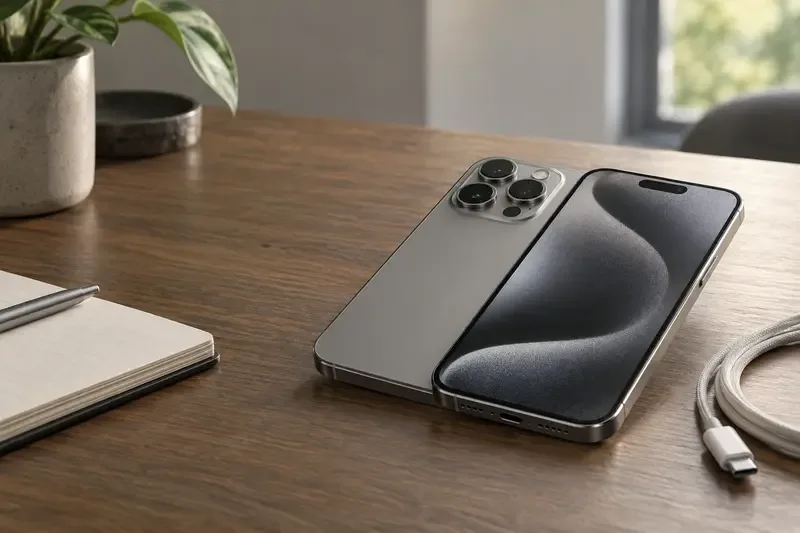
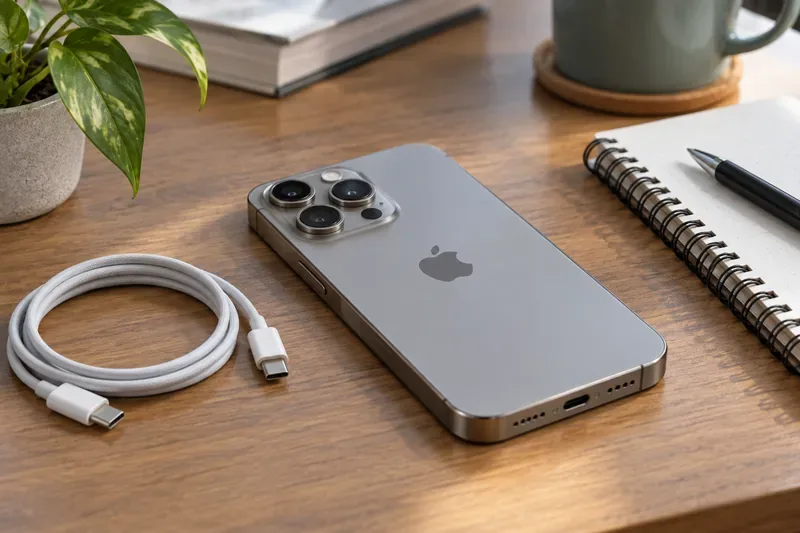
A product-style view of a titanium smartphone with a triple-camera layout and a USB-C cable, reflecting the hardware features discussed in this buying guide.
Why buying an iPhone 15 Pro is harder than it looks
You may find an iPhone 15 Pro advertised as a premium phone for much less than its original price, then wonder whether the discount is a bargain or a warning sign. The confusion is understandable: Apple no longer presents the iPhone 15 Pro as a current model on its U.S. iPhone page, while the phone still has modern hardware, a current software path, and strong demand in the used and refurbished market.
The practical answer is not simply “yes” or “no.” You should buy an iPhone 15 Pro only when the price, battery condition, repair history, carrier status, and return protection make sense together. A clean, unlocked unit can still be an excellent purchase. A heavily repaired phone with a weak battery can erase the savings quickly.
Short answer: buy it at the right price, not at any price
The iPhone 15 Pro remains attractive if you want a relatively compact 6.1-inch Pro iPhone, a 120Hz ProMotion display, a versatile camera system, USB-C, and access to newer iOS releases. It is especially compelling for someone upgrading from an older iPhone who does not need the newest design or the longest possible support runway.
Be more cautious if a seller asks close to the original new-phone price, refuses to show the phone’s settings, cannot prove that it is unlocked, or offers no meaningful return window. At that point, a newer iPhone or a better-protected refurbished device may be the safer use of your money.
What the iPhone 15 Pro still does well
A17 Pro performance
The iPhone 15 Pro uses Apple’s A17 Pro chip, introduced as a 3-nanometer chip with a redesigned GPU and hardware-accelerated ray tracing. In everyday use, that means fast app launches, responsive photo editing, smooth high-refresh-rate scrolling, and enough headroom for demanding games. The chip is not the only factor in long-term value, but it helps explain why the phone does not feel like an obsolete 2023 model.
For most buyers, the performance advantage matters less than the condition of the individual phone. A well-maintained iPhone 15 Pro with a healthy battery can feel better than a newer phone that is damaged, locked to a carrier, or burdened by a poor repair.
6.1-inch OLED display with ProMotion
The smaller Pro model has a 6.1-inch Super Retina XDR display with Always-On and ProMotion technology. ProMotion allows the display to adapt its refresh rate for smoother motion, which is noticeable when scrolling, gaming, and navigating long pages. The size is easier to handle than a Max model, but it also gives you less room for video editing, reading, and gaming.
Inspect the display carefully on a used unit. Look for touch dead spots, unusual brightness differences, cracks around the Dynamic Island, and display messages in Parts and Service History. A replacement display is not automatically a reason to reject a phone, but the seller should explain it and the price should reflect the risk.
Versatile cameras, including 3x telephoto
The iPhone 15 Pro has a 48MP Main camera, an Ultra Wide camera, and a 3x Telephoto camera. Apple also introduced the option to use 24MP as the default high-resolution photo output and added more flexibility around focal lengths. That combination makes the phone useful for everyday photos, portraits, travel, and short-form video without requiring a large camera kit.
Do not confuse the regular iPhone 15 Pro with the iPhone 15 Pro Max when comparing zoom. Apple reserved the 5x Telephoto system for the Pro Max; the smaller 15 Pro uses 3x telephoto. If distant subjects are your priority, the Pro Max or a newer Pro model may justify the higher price.
USB-C and faster wired transfers
USB-C makes the iPhone 15 Pro easier to fit into a modern charging setup. More importantly for creators, the phone supports USB 3 data-transfer speeds of up to 10 gigabits per second when used with a compatible USB 3 cable. The cable included with a listing may not be enough to achieve that speed, so check what is actually included before assuming that every USB-C cable performs the same way.
Action button and titanium design
The Action button replaces the older Ring/Silent switch and can be assigned to functions such as the camera, flashlight, Voice Memos, Focus, Translate, Magnifier, or a Shortcut. The titanium frame and contoured edges also make the 15 Pro feel distinct from older stainless-steel Pro models. These are quality-of-life features rather than reasons to overpay, but they are meaningful if you use shortcuts or want a lighter Pro phone.
iPhone 15 Pro price: separate the launch price from today’s deal
Apple launched the iPhone 15 Pro in the United States at a starting price of $999 for 128GB. The launch lineup also included 256GB, 512GB, and 1TB options. That $999 figure is a historical reference point, not a recommendation for a used phone today.
As of September 2026, Apple’s current U.S. iPhone page highlights newer models rather than the iPhone 15 Pro. In practice, that means most buyers will compare used, open-box, or refurbished listings. Prices can differ sharply based on storage, battery health, cosmetic grade, unlocked status, repair history, warranty, and the seller’s return policy. A low headline price is not automatically the lowest total cost.
Price question
What to use as your benchmark
What did it cost new?
The iPhone 15 Pro started at $999 in the U.S. at launch.
What does it cost now?
There is no single official current price because Apple’s current lineup no longer lists it as a new model; compare live used or refurbished listings by condition.
When is a deal attractive?
When the phone is unlocked, passes the Activation Lock check, has a documented condition, and includes a return window that protects you from hidden faults.
Do not pay a premium for the original box or an unused-looking cable. Prioritize battery condition, parts history, unlocked status, storage, and seller protection. Those factors affect how much usable value you receive every day.
Who should buy an iPhone 15 Pro?
Buy it if you want: a compact Pro iPhone, smooth scrolling, strong cameras, USB-C, and modern performance at a clearly lower price than current flagship models.
Buy it if you are upgrading from: an iPhone 11, iPhone 12, or older model and want a noticeable camera, display, and connector upgrade.
Consider a newer model if you want: the longest remaining software runway, the newest camera features, a fresh warranty, or the lowest chance of battery wear.
Choose the Pro Max instead if you need: the larger screen and 5x telephoto camera, and you are comfortable with a larger, heavier phone.
How to buy a used iPhone 15 Pro without inheriting someone else’s problem
1. Confirm the exact model and storage
Ask the seller to open Settings > General > About. Confirm that the model is an iPhone 15 Pro, not an iPhone 15, an iPhone 14 Pro, or a listing that has been mislabeled. Check the capacity, serial number, IMEI, and whether the information matches the listing. Apple explains where to find these identifiers in its support documentation.
2. Check Activation Lock before paying
This is the most important screening step. Apple says not to take ownership of a used iPhone that is still linked to the previous owner’s account. Turn on the phone and begin setup. If you see “iPhone Locked to Owner,” stop. If the phone shows a passcode lock screen or a normal Home Screen, ask the seller to erase it. The device is ready for a new owner when setup reaches the Hello screen without requesting the previous owner’s Apple Account.
3. Review battery health and repair history
Open Settings > Battery > Battery Health & Charging and inspect maximum capacity and any service message. Then open Settings > General > About and look for Parts and Service History. Apple may label parts as Genuine, Unknown, Unverified, or Used. An Unknown part can affect trade-in value, while an unverified logic board may affect features such as Apple Pay. A repair is not automatically bad, but an unexplained repair should reduce the price or end the deal.
4. Test the hardware in person
Use a short, repeatable check rather than relying on appearance:
Swipe across every part of the display and type on the keyboard to check touch response.
Test Face ID, the Action button, volume buttons, and the side button.
Open each camera, switch between lenses, record a short video, and listen for audio.
Make a call, test the microphone and speaker, and connect to Wi-Fi and Bluetooth.
Plug in a USB-C cable and confirm that the phone charges without an intermittent connection.
Check for overheating, unexpected restarts, camera focus problems, or liquid indicators.
5. Confirm carrier and return protection
“Paid off” does not always mean “unlocked.” Ask the seller to show the carrier-lock status in Settings > General > About, where available, and test your own SIM or eSIM if possible. For an online purchase, choose a seller with a clearly written return period and a warranty. A return window is more valuable than a vague promise that the phone “works fine.”
Common reasons to walk away
The seller will not let you see the About screen or the battery condition.
The device is still linked to another Apple Account.
Face ID, cameras, True Tone, charging, or cellular service does not work normally.
Parts and Service History shows Unknown or Unverified components with no explanation.
The listing hides the carrier status, has no return policy, or is priced close to a newer phone with warranty.
Final buying advice and self-check
Yes, the iPhone 15 Pro can still be a smart buy in 2026, but its value now comes from buying a good example at a sensible used or refurbished price. Its A17 Pro chip, ProMotion display, 48MP camera system, 3x telephoto lens, Action button, and USB-C keep it capable. The main risks are not missing headline features; they are battery wear, hidden repairs, Activation Lock, carrier restrictions, and paying too much for an aging device.
Before you complete the purchase, answer these questions:
Is the phone definitely an iPhone 15 Pro with the storage you need?
Is it unlocked for your carrier and free of Activation Lock?
Have you checked battery health and Parts and Service History?
Do Face ID, every camera, the display, USB-C port, speakers, microphone, and cellular connection work?
Is the final price low enough to compensate for the phone’s age and remaining warranty?
If the answer to all five is yes, the iPhone 15 Pro is still worth considering. If any answer is no, keep searching; the next listing is usually cheaper than repairing the wrong one.