Home
» News
»
Starlink in the UK: How Satellite Internet Works and What Users Need to Know
Starlink in the UK: How Satellite Internet Works and What Users Need to Know
If your UK home is stuck with slow copper broadband, patchy 4G or 5G, or a long wait for full-fiber service, Starlink can look like a shortcut: put a dish outside, connect a router, and get broadband from space. The important detail is that the quality of the result depends on more than the headline speed. A clear view of the sky, the plan available at your address, local network load, weather, Wi-Fi conditions, and even how you need to use IP networking can all affect whether it is a good fit.
Last verified: September 24, 2026. Starlink changes plans, promotions, hardware offers, and performance targets over time. For that reason, this guide uses current official sources but treats the checkout page for your exact UK address as the final source for price and availability.
What a good Starlink result should look like
A successful setup is not simply “the dish is online.” You should be able to use the applications that matter to you—video calls, streaming, cloud work, gaming, or remote access—without frequent obstruction-related dropouts. Your Wi-Fi should also be strong enough that an indoor wireless bottleneck does not hide the quality of the satellite link.
Check
Good sign
When to change approach
Sky view
The planned dish position has a broad, unobstructed view
Trees, rooflines, chimneys, or nearby structures repeatedly cross the required field of view
Service quality
Your important apps stay stable at the times you actually use them
Peak-hour slowdowns or interruptions regularly affect work, calls, or gaming
Home network
Performance near the router is similar to a wired or close-range test
Speed collapses only in distant rooms; fix Wi-Fi before blaming the satellite link
Cost and terms
The total hardware, mounting, monthly service, and electricity costs fit your use case
A fixed-line or fixed-wireless option offers similar performance with lower total cost or fewer installation constraints
How Starlink satellite internet actually works
Traditional satellite broadband often relies on geostationary satellites roughly 35,786 km above Earth. Starlink instead uses a large constellation of satellites in low Earth orbit, with many operating around 550 km. Because the radio path is much shorter, latency can be far lower than on conventional geostationary satellite links. Starlink's own technology page describes latency around 25 ms in favorable cases, compared with 600 ms or more for geostationary systems. See the official Starlink technology overview.
Your outdoor terminal is a phased-array antenna. It electronically steers its radio beam toward satellites moving across the sky. Traffic goes from your terminal to a satellite, then toward a terrestrial gateway or across inter-satellite laser links before reaching a point of presence connected to the wider internet. The return traffic follows the network back to your terminal. Because the satellites move, your terminal must repeatedly hand traffic from one satellite to another.
This architecture explains both Starlink's strength and its main installation constraint: the service does not need a cable from your property to a street cabinet, but it does need a sufficiently clear view of the moving satellites overhead.
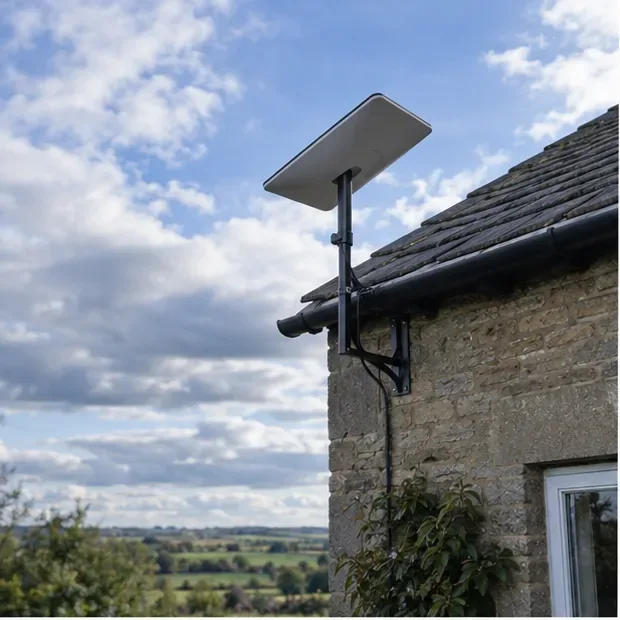
A high mounting position can help clear nearby roofs and vegetation. The important outcome is an unobstructed field of view, not simply mounting the terminal as high as possible.
Step 1: Check what is available at your exact UK address
Start with the easiest comparison: check the fixed broadband and mobile options already available to your property, then compare them with Starlink. Ofcom's Spring 2026 Connected Nations update said the number of UK premises unable to access affordable “decent broadband” had fallen substantially, in part because lower-priced satellite services were available to some hard-to-reach premises. That makes Starlink especially relevant where wired and fixed-wireless choices remain weak, but it does not mean satellite should automatically replace a good full-fiber connection. See Ofcom's Connected Nations Spring 2026 update.
For Starlink itself, enter your service address on the official UK Residential page. Do not assume a price you saw in an advertisement applies to you: Starlink's legal information says pricing can vary by location, equipment, and offer.
If you want portable rather than fixed service, the UK Starlink Roam page currently lists Roam 100GB from £55 per month and Roam Unlimited from £100 per month. Those were the published UK rates when this article was checked on September 24, 2026; re-check before ordering because plans and prices can change.
Step 2: Test the sky before you commit to a permanent installation
The most common physical reason for disappointing Starlink performance is obstruction. Trees, roof edges, poles, chimneys, and nearby buildings can interrupt the radio path as satellites move. Starlink's Standard installation guide says the terminal needs a clear view of the sky and recommends using the obstruction tool before choosing the final position. The current guide shows a 110-degree field of view for the Standard terminal. See the official Standard installation guide.
Walk to the exact places where you could realistically mount the terminal. Check from the intended height, not just from the ground. If one spot has a tree branch cutting into the view, test another side of the building before deciding you need a roof installation.
Check the sky from the intended mounting position before ordering extra mounting hardware. A location that looks open from ground level can still be obstructed from the terminal’s actual perspective.
Change approach when: there is no safe location with a sufficiently open view. In that case, a professional roof or pole installation may help, but a risky DIY climb is not a sensible way to rescue the project. Starlink itself advises seeking professional help when you cannot install safely or clear obstructions.
Step 3: Plan the mount, cable route, and power before installation day
A temporary ground setup is useful for testing, but a permanent installation should protect the cable, keep the terminal secure in wind, and avoid positions where new foliage or building features may block the view. Starlink's current Standard specification sheet lists the antenna at about 2.9 kg, or more with the kickstand and cable, and rates the Standard terminal for outdoor exposure. The same sheet lists average power consumption at 75–100 W for the Standard hardware. See the official Standard specifications.
That continuous power draw matters in off-grid homes, cabins, motorhomes, and backup-power planning. It can also matter during UK power outages: satellite service may still exist overhead, but your terminal and router need electricity. If resilience is a priority, size your backup power for the hardware you actually own rather than assuming every Starlink model draws the same amount.
Step 4: Verify the connection before judging the service
After setup, give the terminal time to connect and update. Then test in a way that separates the satellite link from your home Wi-Fi. First, run a test close to the Starlink router or use a wired connection if your hardware and network setup support it. Next, test from the rooms where you normally work or stream. If performance is good near the router but poor upstairs or behind thick walls, the problem is probably Wi-Fi coverage rather than the satellite connection.
Look beyond a single speed-test result. A healthy setup should also survive a long video call, a large download, and a busy evening. Starlink states that actual performance varies by location, time of day, plan priority, and network demand. Its Fair Use Policy also says speeds can be reduced temporarily when the network is congested. See the Starlink Fair Use Policy.
Test the applications that matter, not just a headline download number. Video calls are a useful check because they expose latency, packet loss, and Wi-Fi problems that a short speed test can miss.
What speeds and latency should UK users expect?
There is no single honest number for every UK address. Starlink publishes different performance ranges for different plans and regions, and its consumer pages increasingly advertise plan-specific maximums. The practical way to use these figures is as expectations, not guarantees.
Starlink's general specifications say land users commonly see tens to hundreds of megabits per second, with latency typically in the tens of milliseconds. Current plan pages can advertise higher maximum speeds, including up to 300+ Mbps on some Roam offers and up to 400+ Mbps on some residential tiers, but Starlink explicitly says those maximums are not guaranteed and can be slower during congestion.
For real decision-making, measure three things after installation: median download speed during your normal usage window, upload stability during calls or cloud backups, and the frequency of interruptions. A slightly lower but stable connection is often more useful than a connection that occasionally produces a spectacular speed test and then drops during calls.
Weather matters, but obstructions usually deserve attention first
UK rain does not automatically make Starlink unusable, but the service is not weather-proof in the sense of being unaffected. Starlink says moderate to heavy rain, snow, and hail can attenuate the radio signal and cause momentary dropouts. Severe weather near ground stations can also affect service. If performance problems occur only during heavy rain and disappear afterward, weather may be the cause; if interruptions happen every clear day at similar intervals, check the obstruction map first.
The Standard hardware has built-in snow-melt capability, which is more relevant in colder parts of the UK and during unusual winter weather. Do not treat that feature as a substitute for safe access, secure mounting, or sensible cable protection.
Residential versus Roam: choose based on where you will use it
A fixed home connection and a portable connection solve different problems. Residential service is intended for a fixed land-based location. Roam is aimed at travel, camping, motorhomes, and other portable use. If you only need broadband at one rural home, start with the fixed option available at that service address. If you genuinely need to move the terminal between locations, review the current Roam rules instead of assuming a Residential plan can be moved freely.
Portable Starlink can suit camping and motorhome use, but the service plan and permitted in-motion use matter as much as the hardware. Check the current Roam terms before relying on it while traveling.
Starlink changed its international Roam policy in 2026. The current support guidance distinguishes Roam Unlimited from other Roam plans and sets different rules for international use. If cross-border travel matters to you, read the current rules immediately before a trip rather than relying on older advice.
Important UK contract details to read before checkout
Starlink's current consumer terms for Great Britain contain an important conditional rule: if you choose an offer with a service commitment, the commitment period is 12 months and changing or canceling the service during that period can trigger a prorated change fee. The terms currently identify the starting change fee as £299. This does not mean every Starlink order has a 12-month commitment; it applies when a service commitment is selected at checkout. Read the exact order summary before paying.
The same Great Britain terms describe a 30-day return route for eligible, undamaged, untampered, and unmodified Starlink Kits purchased through Starlink, including cases where the service does not work because of field-of-view problems. Conditions apply, especially for rented equipment and committed offers. Read the current Starlink consumer terms for Great Britain rather than relying on a summary.
Advanced users: understand CGNAT before hosting services
For ordinary web browsing, streaming, and video calls, Starlink's default networking is usually transparent. For self-hosting, inbound VPNs, game servers, security cameras, or other services that expect a directly reachable IPv4 address, it matters a lot.
Starlink's default IPv4 configuration uses carrier-grade network address translation (CGNAT), which blocks unsolicited inbound IPv4 connections. Starlink also supports native IPv6, while public IPv4 is available only on certain Priority-class plans. If you need inbound connectivity, confirm the current plan features and consider whether IPv6, a VPN overlay, a tunnel, or a Priority plan fits your architecture.
UK network capacity is still evolving
Starlink is not a finished, static network. Ofcom continues to license infrastructure that can change UK capacity and resilience. On July 20, 2026, Ofcom granted Starlink two non-geostationary gateway earth-station licenses in Harlow, Essex and Mulberry Wharf, London. Ofcom said the decision should help improve the capacity and resilience of Starlink's existing UK satellite connectivity services. See Ofcom's July 2026 Starlink gateway decision.
That is useful context, but it should not be read as a promise that every household will see faster service. Satellite capacity is shared geographically, and local demand still matters.
Final self-check: is Starlink working well enough for you?
After several days of normal use, judge the service against your real needs. A strong result looks like this:
The obstruction view is clear enough that interruptions are rare for your normal activities.
Video calls remain stable during the busiest part of your day.
Streaming works at the quality your household expects without repeated buffering.
Upload performance is sufficient for cloud backups, file sharing, and calls.
Your indoor Wi-Fi reaches the rooms that matter, or you have added a suitable mesh or wired network.
The monthly plan, power draw, mounting cost, and any contract commitment still make sense compared with local alternatives.
If the satellite link is solid but Wi-Fi is weak, fix the home network. If Wi-Fi is good but the obstruction map shows repeated blockage, relocate or raise the terminal safely. If the sky is clear but evening performance repeatedly misses what your household needs, compare another plan or another access technology. That sequence avoids replacing the wrong part of the system.
Starlink can be a particularly valuable option for UK properties that remain poorly served by fixed networks, but its best use case is specific: a location with a clear sky, realistic performance expectations, and a total cost that is justified by the alternatives available at that address.