Home
» News
»
TSA’s New 3D Bag Scanners: What Travelers Need to Know
TSA’s New 3D Bag Scanners: What Travelers Need to Know
The most important thing to know: TSA’s newer 3D carry-on bag scanners can make airport security easier, but they do not automatically change the rules for every traveler at every checkpoint. At lanes equipped with computed tomography (CT) scanners, officers can inspect a detailed 3D image of your bag and, in many cases, allow electronics and travel-size liquids to stay packed. However, equipment varies by airport and even by lane, and TSA officers may still ask you to remove items or send a bag for additional screening.
That means the safest strategy is simple: pack as though you might use a traditional checkpoint lane, then follow the instructions posted at your specific lane. Do not assume that seeing a large, rounded scanner means every familiar rule has disappeared.
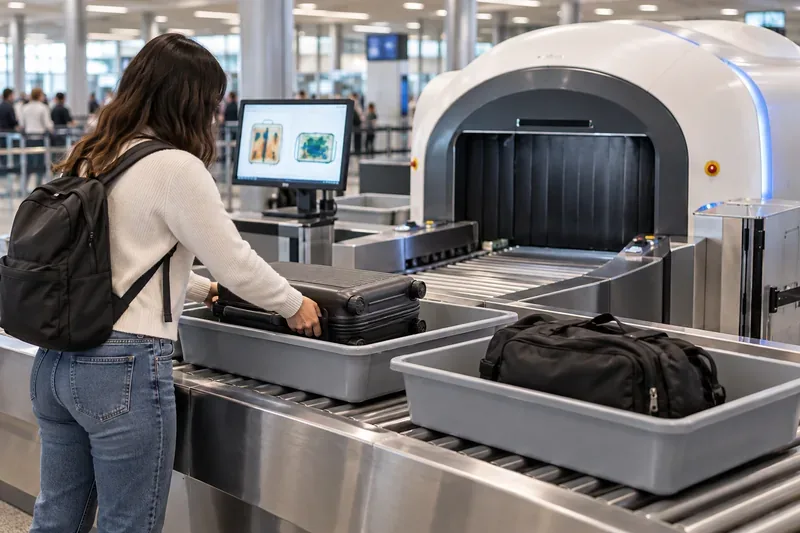
A traveler places carry-on luggage into a screening bin at a checkpoint equipped with a rounded CT-style baggage scanner.
What TSA’s 3D bag scanners actually do
The technology is called computed tomography, or CT. Unlike a conventional two-dimensional X-ray image, CT equipment produces a three-dimensional view of a carry-on bag. TSA says officers can rotate the image and examine it from multiple angles, which can help them separate overlapping objects and inspect areas that would otherwise be hard to interpret.
TSA’s Checkpoint Requirements and Planning Guide describes these systems as Checkpoint Property Screening Systems, or CPSS. The agency says CT scanning can reduce the need for passengers to remove some items because officers can manipulate the 3D image when a bag is crowded or visually complex.
This is not a single brand or model. TSA’s published certified technology list includes CT checkpoint systems from several manufacturers. So the machines may look different from one airport to another.
What changes for travelers at a CT-equipped lane
The biggest practical change is that you may be told to leave items in your carry-on that you would normally remove. TSA’s innovation-checkpoint material states that when a CT unit is in use, travelers can leave electronics and travel-size liquids in their carry-on luggage. The agency’s 2023 year-in-review also said CT scanners reduced the need to remove electronics and travel-size liquids, aerosols and gels from bags.
For example, imagine you are traveling with a laptop, tablet, phone charger and a quart-size bag of 3.4-ounce toiletries. At a CT-equipped lane, the officer may instruct you to keep all of those items inside the suitcase. At a neighboring conventional lane, you could still be asked to take the laptop out. The correct action is whatever the officer and signage at your actual lane tell you to do.
A quick comparison
Situation
What you may be asked to do
What to remember
CT/3D scanner lane
Keep some electronics and travel-size liquids in the bag
Follow lane-specific instructions; additional screening is still possible
Traditional X-ray lane
Remove laptops and certain larger electronics
Pack them where they are easy to reach
TSA PreCheck lane
Eligible travelers generally keep laptops and compliant liquids packed
PreCheck procedures are a separate program from CT scanner deployment
What does not change: the 3-1-1 liquids limit still matters
A common misunderstanding is that a 3D scanner means you can bring larger bottles of ordinary liquids through the checkpoint. TSA’s published travel guidance still states the 3-1-1 rule for carry-on liquids, aerosols, gels, creams and pastes: containers are generally limited to 3.4 ounces (100 milliliters) or less, placed in a single quart-size clear bag, subject to the normal exceptions for medically necessary liquids and certain other permitted items.
In other words, CT technology can change whether you need to remove your compliant liquids bag for screening, but it does not by itself turn a 12-ounce shampoo bottle into an allowed carry-on item. Check the current TSA travel guidance before departure if your packing depends on a liquid-size exception.
You may still get a bag check
Better imaging does not eliminate secondary screening. TSA notes that even generally permitted items can receive additional screening if they trigger an alarm, look unusual on the image, appear tampered with or raise another security concern. An officer can also ask you to separate food, powders or other dense items that make a bag difficult to interpret.
For travelers, this means “leave everything in your bag” should not be read as a guarantee that the bag will never be opened. If you pack several dense chargers, camera equipment, books and food tightly together, the image may still require a closer look. Keeping the bag organized can make the process easier even when a CT scanner is available.
Why you should not plan around a specific scanner being available
TSA has been expanding CT screening for years, and the rollout is still continuing rather than happening all at once. In a 2026 Department of Homeland Security acquisition forecast, TSA described CT as a major checkpoint-screening capability and outlined a new requirement for base, mid-size and full-size CPSS units, including installation and support. That indicates continued deployment, but it does not provide a traveler-facing list guaranteeing CT equipment at every checkpoint lane.
The practical result is that airport name alone is not enough. A large airport can have multiple terminals, checkpoints and lane types. A lane may also be closed, reconfigured or operating different equipment on the day you travel. TSA’s own planning guide describes several CT configurations, so travelers should expect variation.
If you want the least stressful approach, organize your carry-on for the stricter possibility. Put your laptop and larger electronics where you can remove them quickly. Keep compliant liquids together. Avoid burying dense objects beneath multiple layers of clothing. Start with an empty bag so you do not accidentally bring a prohibited item left in a side pocket from a previous trip.
This approach is useful even if you expect a CT scanner because it keeps you flexible. Suppose you arrive at your usual airport and the CT lane has a long line while another checkpoint is moving faster with conventional X-ray equipment. You can switch without repacking at the security table.
Do CT scanners make security lines faster?
They can reduce some of the divesting and repacking that slows passengers down, especially when travelers are allowed to leave electronics and compliant liquids inside. But a faster personal experience is not guaranteed. Throughput also depends on staffing, passenger volume, lane layout, automated bin systems, alarm rates and how efficiently people follow instructions.
TSA’s Las Vegas innovation-checkpoint fact sheet describes CT scanners working with automated screening lanes and RFID-tracked bins, a combination designed to improve how bags move through screening. You can read the agency’s innovation checkpoint fact sheet for a technical example of how CT can be integrated with other checkpoint systems.
What about TSA PreCheck?
TSA PreCheck and 3D CT screening are related only in the sense that both can reduce how much you remove from your bag. They are not the same thing. PreCheck is a trusted-traveler screening program with its own eligibility and lane procedures. CT is baggage-screening technology that can be used in different checkpoint configurations.
TSA’s current item guidance still says that standard-screening passengers may be asked to remove laptops, while TSA PreCheck travelers generally do not need to remove laptops or their 3-1-1 liquids. You can verify item-specific instructions in TSA’s What Can I Bring? list.
What should you do when you reach the checkpoint?
Read the signs before unloading your bag.
Listen for officer instructions, because procedures can differ by lane.
Do not remove a laptop automatically if the lane tells you to keep electronics packed.
Do not assume the 3-1-1 liquid-size limit is waived just because the scanner is newer.
Keep important electronics, medications and documents organized so they are easy to access if an officer asks for them.
Expect that any bag can be selected for additional screening.
The bottom line
TSA’s 3D CT scanners are mainly a better way to inspect what is already inside your carry-on. For travelers, the most noticeable benefit is the possibility of leaving laptops and travel-size liquids packed at equipped lanes. The important limitation is that the rollout is not uniform and the underlying rules on prohibited items and standard liquid quantities still apply.
As of September 2026, the best preparation is therefore not to memorize one universal “new TSA rule.” Pack so you can comply with either a CT lane or a traditional X-ray lane, then follow the instructions at the checkpoint in front of you. That gives you the benefit of the newer technology when it is available without being caught off guard when it is not.