Home
» News
»
What Is a Paywall? How It Works, the Main Types, and When to Subscribe
What Is a Paywall? How It Works, the Main Types, and When to Subscribe
A paywall is a digital access rule that keeps some online content or features available only to people who meet certain conditions. Those conditions may be paying for a subscription, signing in, registering for a free account, or staying within a set number of free views. A paywall does not always mean you must pay immediately: the site may offer a preview, a free article allowance, or some content that remains open to everyone.
For example, you might read three stories on a news site without signing in and then see a message asking you to subscribe. Another site may let you read its daily news for free while reserving investigations and analysis for subscribers. The screen looks similar, but the rule behind it is different.
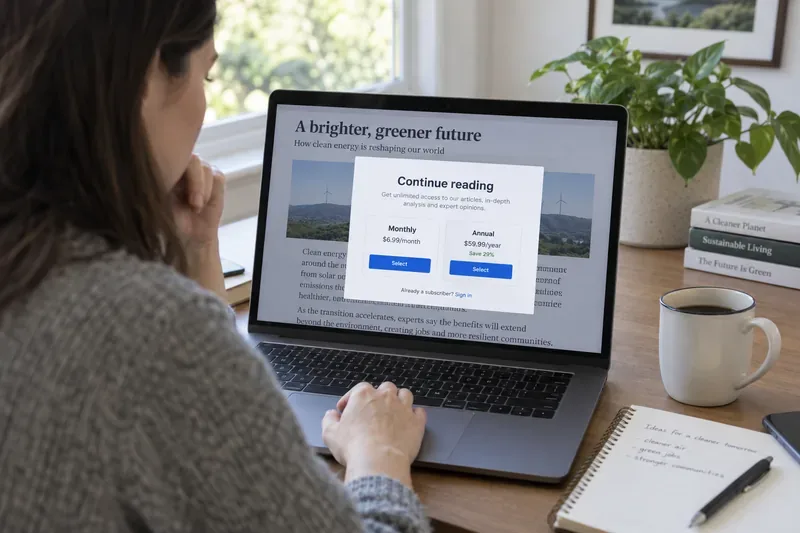
A reader sees part of an article behind a subscription prompt; the generic plan layout is illustrative, and the prices shown are not an offer from a real publisher.
How does a paywall work?
When you open a page, the publisher’s website checks what access that page requires and whether your visit qualifies. In a simple flow, the site identifies the article as free or restricted, checks whether you are signed in and entitled to read it, and then either displays the content or asks you to take another step. That step might be creating an account, entering subscriber credentials, or choosing a paid plan.
For a subscriber, access is usually tied to an account or another proof of purchase. After the publisher confirms the account has an active entitlement, the site or app lets that reader view the restricted material. If you bought access but still see a wall, signing in with the account used for the purchase, restoring an app purchase, or contacting the publisher’s support team may resolve it. The exact steps depend on the publisher and where you subscribed.
A site can apply its access rules using information such as your account status, the article’s category, or how many eligible pages you have already viewed. The counter may be associated with a signed-in account, a browser cookie, or other signals chosen by the publisher. As a result, a free-article limit may not behave identically across devices or browsers. Publishers set their own rules, so there is no universal meter or reset schedule.
Common kinds of paywalls
Metered paywall
A metered paywall allows a limited number of free reads during a stated period, then asks the reader to subscribe or register. A news app might allow a certain number of full articles each month. Apple describes this model in its developer guidance as access to a finite amount of content for a specified duration; its example is a news app that allows 10 full articles per month. That is an example, not a standard limit that applies to other publishers. Check the notice for the site’s actual allowance and reset period.
Freemium or premium-content model
With a freemium model, some material remains open while selected articles, tools, videos, or other features require payment. A publisher might leave breaking news free but reserve long-form reporting for subscribers. You may encounter a padlock label or a subscription prompt before opening a particular item, even if you have not used any free reads.
Hard paywall
A hard paywall requires a subscription for most or all of a site’s content. A publisher may still show a headline, summary, or short excerpt, but the full article is restricted. This model is most practical for readers who already know the publication’s work is valuable to them; a casual visitor may have little free material to judge first.
Registration wall
A registration wall asks you to create an account or provide an email address before reading. It may not require payment, but the site is still restricting access. Google’s publisher guidance distinguishes reader registration from selling a subscription, and explains that a publisher can grant access to premium content to registered readers. Read the prompt closely so you know whether registration is free, what information is requested, and whether a paid subscription is also required.
Dynamic or hybrid access
Some publishers combine these approaches. The meter, preview, or offer can differ by content type or reader status. One article may be open, another may count against a monthly limit, and a third may be reserved for subscribers. Because these rules are publisher-specific and can change, use the notice displayed on the current page rather than assuming that an older limit still applies.
Why do publishers use paywalls?
A subscription gives a publisher a direct way to earn revenue from readers who want its work. It can help fund reporting, specialist advice, research, entertainment, or access to digital tools. Some publishers also rely on advertising, donations, events, or a mix of revenue sources. A paywall is therefore a business choice about which material is free and which access is funded by a payment or account relationship; it does not, by itself, tell you whether the content is worth the price.
The model also explains why two sites covering the same subject may have different access rules. One may rely on advertising and keep most pages open. Another may charge for a specialist archive, professional analysis, or ongoing reporting. Whether a paywall is useful to you depends on the specific material you need, how often you use it, and the alternatives available.
Should you subscribe?
Consider subscribing when you read the publication regularly, need its distinctive reporting or tools, and understand the recurring cost. Before choosing, check:
What is included: Does the plan unlock the article you want, the full site, an app, an archive, or additional products?
What it costs over time: Note the regular renewal price, billing frequency, taxes if shown, and whether a discounted introductory rate changes later.
How cancellation works: Find out where to manage the subscription. If you subscribed through an app store, billing and cancellation may be handled there rather than on the publisher’s website.
Whether you have access already: A school, employer, public library, or another household plan may provide legitimate access. Availability depends on the institution and publisher.
How often you will use it: If you only need one article, a free preview, a library service, or a one-time purchase—if the publisher offers one—may suit you better than a recurring plan.
For example, imagine you reach a meter after reading several local-news stories. If you follow that outlet every week and the subscription price fits your budget, a plan may make sense. If you only need one piece for a project, first look for a free version from the publisher, check your library’s digital resources, or ask whether your institution provides access. Those options depend on the publisher and library; they are not guaranteed for every article.
What to check before you pay
Read the subscription screen before confirming. Apple’s guidance for app subscriptions says the sign-up screen should clearly show the subscription name and duration, what is provided, and the full renewal price. On a website or app, look for equivalent terms: the amount due now, when the next charge occurs, the regular price after any trial or discount, and how to cancel. Keep the confirmation email or receipt so you can identify the billing provider if you need help.
If a site says you have reached a free limit, check whether it identifies the number of free reads and when the meter resets. If the message offers only a registration option, verify whether that account is free and whether it introduces newsletters or other communications you can opt into or out of. If you are already a paying subscriber, confirm that you are signed in to the correct account and that your plan includes the content you are trying to open.
Is a paywall a technical error?
Usually, no. A subscription message is often the intended access rule, not a broken page. But an error can happen if your account is not recognized, a payment has not been applied, or the page fails to load correctly. Try signing in with the account tied to the subscription, refreshing the page, or using the publisher’s official support route. Avoid entering payment details through a link you do not trust; go directly to the publisher’s website or app to check your account.
For publishers, accurately labeling restricted sections matters too. Google Search Central documents structured data publishers can use to identify subscription or paywalled content, helping Google distinguish it from cloaking. That search guidance concerns how sites describe their content to Google; it does not grant a reader access or establish what any publisher must charge.
The short answer
A paywall is a gate around digital content. Depending on the site, it may ask you to pay, sign in, register, or wait until a free-use allowance resets. To decide whether a subscription fits, identify exactly what it unlocks, check the full recurring price and cancellation terms, and compare it with how often you will use the content and any legitimate access you already have. The publisher controls its own rules, so the wording on the current offer is the final guide.