วิธีการติดตั้ง Directus 6.4 CMS บน CentOS 7 LAMP VPS

เรียนรู้วิธีการติดตั้ง Directus 6.4 CMS บน CentOS 7; ระบบการจัดการเนื้อหา Headless ที่มีความยืดหยุ่นสูงและปลอดภัย
AlternC เป็นแผงควบคุมฟรีที่ใช้กับเว็บเซิร์ฟเวอร์ AlternC เป็นทางแยกของแผงควบคุมที่ใช้โดยโฮสต์ฟรีทางเลือกจนกว่าจะถูกปิดในปี 2000 ขณะนี้ได้รับการปรับปรุงโดยผู้ให้บริการโฮสต์ที่ไม่แสวงหาผลกำไรจำนวนหนึ่ง
AlternC เป็นโอเพนซอร์สและสามารถพบได้ในที่เก็บ Git บน GitHub เราจำเป็นต้องติดตั้ง Git บนเซิร์ฟเวอร์ Debian Squeeze, Wheezy หรือ Jessie ของเรา:
apt-get install git
ต่อไปลองโคลนที่เก็บ Git:
git clone https://www.github.com/AlternC/easy-install.git
ตอนนี้เราสามารถเรียกใช้สคริปต์การติดตั้ง ก่อนอื่นให้ไปที่easy-installโฟลเดอร์:
cd easy-install
ทำให้สคริปต์การติดตั้งดำเนินการได้:
chmod +x install.sh
สุดท้ายให้รันสคริปต์การติดตั้ง:
./install.sh
=====                           Warning                            =====

This installation script helps to test or install AlternC for
the first time and / or don't know so much about Linux, network etc.

Using this script will provide a working installation, but if you need
something more specific you might prefer a custom installation.

To learn more about the choices made for this installer, please read
http://www.alternc.org/simpleInstaller

Do you want to continue the installation? (Y/n)
พิมพ์ 'Y' แล้วกด Enter เพื่อดำเนินการต่อ
=====        Your AlternC server needs a public IP Address         =====

This makes it available on the web from everywhere in the world.

For your information, here are the internet addresses of this machine:

[YourServerIP]

Please provide the public IP address
AlternC ตอนนี้ต้องการที่อยู่ IP สาธารณะของเซิร์ฟเวอร์ Vultr ของคุณ หากมีที่อยู่อินเทอร์เน็ตเพียงหนึ่งที่แสดงนั่นอาจเป็น IP สาธารณะของคุณ ตรวจสอบให้แน่ใจว่าได้ตรวจสอบอีกครั้งจาก my.vultr.com
ป้อน IP ของคุณแล้วกด Enter
=====              Your AlternC needs a domain name                =====

This domain name will be used to access the panel and send/receive mail.

You must use an original domain name dedicated for this purpose.
In other words, do not use a domain name intended to be your company or
personal website.
For example, 'example.com' is not good, unless your company is the
hosting service by itself. 'panel.example.com' will work better,
allowing you to still have your website on 'www.example.com'

If you are unsure, here are a few solutions:
1.  Create a subdomain dedicated to AlternC on a domain name you own
2.  Use the free AlternC.net domain name service

We recommand using the AlternC.net subdomain name if you are new to this.
You'll only need to request your subdomain on http://www.alternc.net and
point it to the IP address you just provided.
Your AlternC domain name might then look like 'example.alternc.net'

Do you want to use AlternC.net domain name service? (Y/n)
AlternC ต้องการชื่อโดเมนที่สามารถทำงานได้ panel.example.comนี้จะมีโดเมนย่อยเช่นกันเช่น AlternC ให้บริการโดเมนย่อยฟรีอย่างไรก็ตามขอแนะนำให้ตั้งค่าโดเมนของคุณเอง (sub) สิ่งนี้ต้องชี้ไปที่เซิร์ฟเวอร์ Vultr ของคุณ
เนื่องจากฉันจะตั้งค่าโดเมนย่อย (ตัวเอง) ฉันจะเข้าสู่ 'n' ทันที
  For your information, this server hostname is :
  alternc

  Please provide your AlternC domain name
ใส่โดเมนของคุณ (ย่อย) สำหรับ AlternC ที่นี่เช่นหรือpanel.example.com example.comนี่ไม่ใช่โดเมน (ย่อย) ที่คุณวางแผนจะโฮสต์บนเซิร์ฟเวอร์ AlternC ของคุณ
=====              Your AlternC needs DNS Servers                =====

Domain Name Servers announce addresses of the domain names on the web.

If you don't have at least two name servers with minimal redundancy, we
highly recommand you the free service we provide (see http://alternc.net )

Do you want to use AlternC.net name servers ?(Y/n)
AlternC ต้องการเซิร์ฟเวอร์ DNS หากคุณไม่มีเซิร์ฟเวอร์ DNS ของคุณเอง AlternC สามารถให้เซิร์ฟเวอร์ DNS หากคุณต้องการใช้พิมพ์ 'Y' มิฉะนั้นพิมพ์ 'n' ฉันจะใช้เซิร์ฟเวอร์ DNS ของพวกเขา
=====           Optional installation: roundcube webmail           =====

Roundcube is the webmail software proposed by AlternC.

We recommand adding it to your installation.

Would you like to install Roundcube? (Y/n)
Roundcube เป็นซอฟต์แวร์ยอดนิยมที่ใช้สำหรับเว็บเมล หากคุณวางแผนที่จะใช้เว็บเมลเราขอแนะนำให้ใช้ Roundcube
=====      Optional installation: mailman mailing list manager     =====

Mailman is the mailing list software proposed by AlternC.

Would you like to install Mailman? (Y/n)
AlternC ได้รับการสนับสนุนสำหรับรายชื่อผู้รับจดหมายจึงมีตัวเลือกให้คุณติดตั้ง Mailman ฉันจะไม่ใช้รายชื่อผู้รับจดหมายหรือ Mailman
AlternC จะเริ่มดาวน์โหลดสิ่งที่จำเป็นต้องมีและติดตั้งหลังจากนี้ โปรดทราบว่าอาจใช้เวลาสักครู่เนื่องจากจะต้องติดตั้ง LAMP stack และซอฟต์แวร์อื่น ๆ AlternC ขึ้นอยู่กับ
หลังจากการติดตั้ง AlternC จะให้ชื่อผู้ใช้และรหัสผ่านสำหรับแผงควบคุมตัวเองเช่นเดียวกับ MySQL ตัวอย่าง:
************************************************************
*                                                                         *
*               Admin account                               *
*               ------------                                      *
*                                                                         *
* user: admin             password: admin        *
*                                                                         *
* Please change this as soon as possible! *
*                                                                         *
************************************************************
สำหรับ MySQL:
An important password has just been generated.

It is the mysql root (or master) password.

This password has been stored in the root directory : /root/.my.cnf

For your information this password is :

  x

Service apache2 is running OK

Service master is running OK

Service mysqld is running OK
ตอนนี้คุณจะสามารถเข้าถึง AlternC ผ่านโดเมน (ย่อย) ที่คุณใช้
แผงธุรการ:
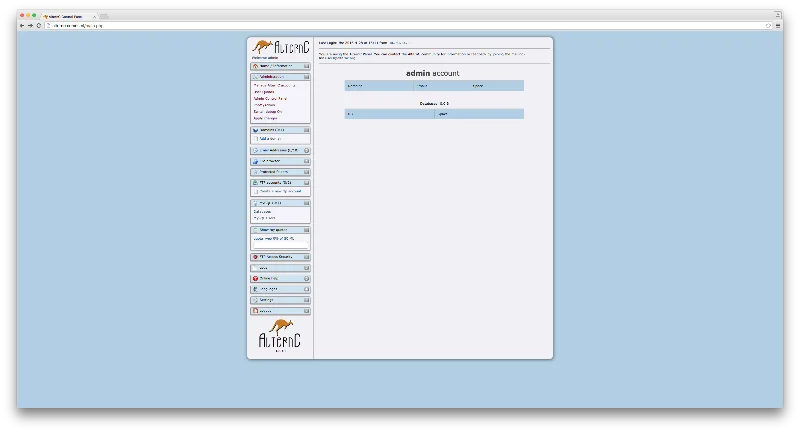
ขอแสดงความยินดีขณะนี้คุณได้ติดตั้ง AlternC บนเซิร์ฟเวอร์ Vultr ของคุณเรียบร้อยแล้ว!
เรียนรู้วิธีการติดตั้ง Directus 6.4 CMS บน CentOS 7; ระบบการจัดการเนื้อหา Headless ที่มีความยืดหยุ่นสูงและปลอดภัย
เรียนรู้วิธีการตั้งค่า Nginx บน Ubuntu สำหรับการสตรีมวิดีโอสด HLS ด้วยคำแนะนำที่ชัดเจนและเป็นประโยชน์
เรียนรู้การใช้ Percona XtraBackup สำหรับการสำรองข้อมูลด้วยวิธีที่เป็นระบบและง่ายดายบน WordPress ออนไลน์ของคุณ
ReactOS ซึ่งเป็นโอเพ่นซอร์สและระบบปฏิบัติการฟรีพร้อมเวอร์ชันล่าสุดแล้ว สามารถตอบสนองความต้องการของผู้ใช้ Windows ยุคใหม่และล้ม Microsoft ได้หรือไม่? มาหาข้อมูลเพิ่มเติมเกี่ยวกับรูปแบบเก่านี้ แต่เป็นประสบการณ์ OS ที่ใหม่กว่ากัน
การโจมตีของ Ransomware กำลังเพิ่มขึ้น แต่ AI สามารถช่วยจัดการกับไวรัสคอมพิวเตอร์ตัวล่าสุดได้หรือไม่? AI คือคำตอบ? อ่านที่นี่รู้ว่า AI boone หรือ bane
ในที่สุด Whatsapp ก็เปิดตัวแอพเดสก์ท็อปสำหรับผู้ใช้ Mac และ Windows ตอนนี้คุณสามารถเข้าถึง Whatsapp จาก Windows หรือ Mac ได้อย่างง่ายดาย ใช้ได้กับ Windows 8+ และ Mac OS 10.9+
อ่านข้อมูลนี้เพื่อทราบว่าปัญญาประดิษฐ์กำลังได้รับความนิยมในหมู่บริษัทขนาดเล็กอย่างไร และเพิ่มโอกาสในการทำให้พวกเขาเติบโตและทำให้คู่แข่งได้เปรียบ
เมื่อเร็ว ๆ นี้ Apple เปิดตัว macOS Catalina 10.15.4 การอัปเดตเสริมเพื่อแก้ไขปัญหา แต่ดูเหมือนว่าการอัปเดตทำให้เกิดปัญหามากขึ้นที่นำไปสู่การสร้างเครื่อง Mac อ่านบทความนี้เพื่อเรียนรู้เพิ่มเติม
13 เครื่องมือดึงข้อมูลเชิงพาณิชย์ของ Big Data
คอมพิวเตอร์ของเราจัดเก็บข้อมูลทั้งหมดในลักษณะที่เรียกว่าระบบไฟล์บันทึก เป็นวิธีการที่มีประสิทธิภาพที่ช่วยให้คอมพิวเตอร์สามารถค้นหาและแสดงไฟล์ได้ทันทีที่คุณกดค้นหาhttps://wethegeek.com/?p=94116&preview=true