Home
» iOS
»
iPhone 18 Pro Display and Headaches: What’s Confirmed, What Isn’t, and What to Try
iPhone 18 Pro Display and Headaches: What’s Confirmed, What Isn’t, and What to Try
Updated September 14, 2026: Apple has announced the iPhone 18 Pro and iPhone 18 Pro Max, but they do not reach general availability until September 18. That timing matters. There is not yet enough credible evidence to say that the new iPhone 18 Pro display is broadly “causing headaches” in users. What is confirmed is more specific: Apple uses OLED displays, says iPhone brightness is controlled with pulse width modulation (PWM), and now offers a setting called Display Pulse Smoothing because PWM can make a dim display appear to flicker for some people.
So the useful question is not “Is the iPhone 18 Pro display bad for your eyes?” It is: if this screen feels uncomfortable to you, how can you test the likely variables, tell whether a change actually helps, and know when the problem may need a different solution?
A bright OLED screen in a dim environment can feel uncomfortable to some people, but a headache by itself does not prove that a particular phone or display technology is the cause.
The short answer: the headline is ahead of the evidence
Apple’s confirmed iPhone 18 Pro display specifications include a 6.3-inch Super Retina XDR OLED panel on iPhone 18 Pro and a 6.9-inch OLED panel on iPhone 18 Pro Max. Both support ProMotion with adaptive refresh rates up to 120Hz, an Always-On display, HDR, True Tone, a typical 2,000,000:1 contrast ratio, up to 3,000 nits peak outdoor brightness, a 1-nit minimum brightness level, and an anti-reflective coating. You can verify those details on Apple’s official iPhone 18 Pro specifications.
What Apple has not published on that specifications page is equally important. It does not list a PWM frequency, modulation depth, or waveform for the iPhone 18 Pro panel. It also does not claim that ProMotion at 120Hz eliminates PWM-related flicker. Without those measurements, it is not responsible to declare the new panel more or less headache-inducing than an older iPhone based on refresh rate alone.
Practical outcome: treat “the iPhone 18 display causes headaches” as an unproven generalization. If you are sensitive to screens, focus on your own repeatable symptoms and the settings that change them.
What is actually new, and what might matter for comfort?
Display characteristic
What Apple confirms
What it means for comfort
OLED panel
Super Retina XDR OLED
OLED enables deep blacks and high contrast, but brightness control can involve temporal modulation.
ProMotion
Adaptive refresh rate up to 120Hz
This affects how often visual content is refreshed. It is not the same thing as PWM dimming.
Brightness range
1 nit minimum; up to 3,000 nits peak outdoors
Low minimum brightness can help in dark rooms, while very bright output helps outdoors. Neither number alone predicts headache risk.
Anti-reflective coating
Listed on both Pro models
Reduced reflections may improve readability in bright surroundings.
Display Pulse Smoothing
Available as an accessibility display option on iPhone
Apple says it creates smoother dimming at low brightness for people who notice PWM-related flicker.
Apple’s September 9 announcement describes the iPhone 18 Pro family and its updated display-related design, including a smaller Dynamic Island, but it does not state that a fundamentally new dimming method has replaced PWM. See Apple’s launch announcement.
The key distinction: 120Hz refresh rate is not PWM frequency
This is the most important technical misunderstanding to clear up. A 120Hz refresh rate describes how often the display can update the image. PWM, by contrast, is a method of controlling perceived brightness by switching light output in a timed pattern. A phone can have a smooth 120Hz interface and still use PWM for brightness control.
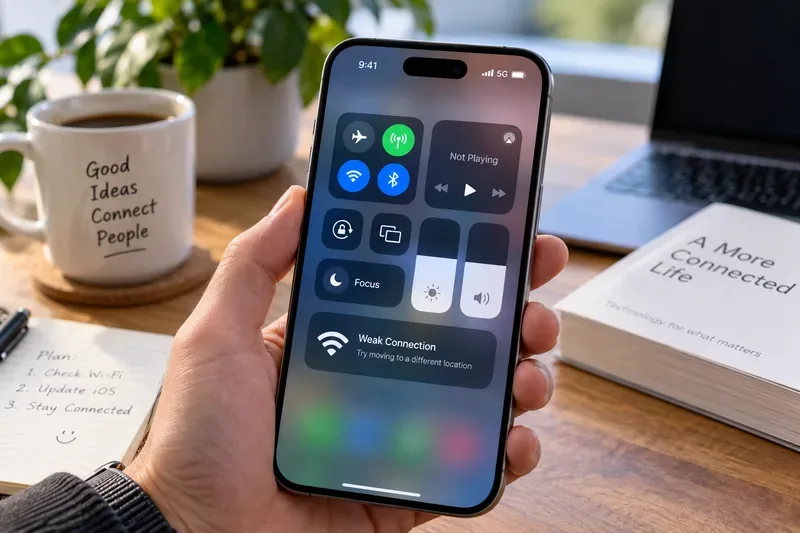
Apple now explicitly explains this in its accessibility documentation: iPhone controls brightness using PWM, and for some people the display may appear to flicker when dim. Apple’s Accessibility features page lists Display Pulse Smoothing, while its iPhone display color and accessibility guide says the setting is designed to make low-brightness dimming smoother.
What to do: if your discomfort is strongest at low brightness, test Display Pulse Smoothing before changing several unrelated settings at once. Apple notes that disabling PWM may affect low-brightness display performance under some conditions, so this is a trade-off rather than a guaranteed improvement.
Can flicker really contribute to headaches?
There is credible evidence that temporally modulated light can be uncomfortable for some people, especially people with migraine or visual sensitivity. Research has found that flickering light can be strongly aversive to some people with migraine, and laboratory work has linked stronger visual-cortex responses to greater reported discomfort. For background, see the original studies indexed by the U.S. National Library of Medicine on flicker sensitivity in migraine and neural responses associated with visual discomfort from flicker.
The International Commission on Illumination also recognizes that temporal light modulation can affect comfort and, under some conditions, contribute to fatigue or migraine episodes. Its technical report on time-modulated lighting systems is useful context.
But none of that proves that an iPhone 18 Pro causes headaches in a particular person. A headache can also be related to migraine, sleep, stress, dehydration, vision correction, prolonged near work, posture, room lighting, or other medical causes. The right test is personal and controlled, not a conclusion based on a single uncomfortable session.
A practical way to test whether the display is the problem
Your goal is simple: after changing one factor, you should be able to use the phone for a normal session with noticeably less eye strain, pressure, nausea, light sensitivity, or headache than under your usual setup. If nothing changes after repeated comparable sessions, move to the next variable instead of assuming the first setting worked.
1. Establish a baseline before changing anything
For two or three typical sessions, note the approximate brightness, room lighting, duration of use, type of content, and when symptoms begin. Keep the sessions reasonably comparable. A symptom that appears after 10 minutes in a dark room but not after 40 minutes in daylight is more informative than a vague memory that “the screen felt bad.”
Success sign: you can identify a repeatable pattern. Change approach if: symptoms occur unpredictably across many devices and environments; that makes a single display setting a less convincing explanation.
2. Test Display Pulse Smoothing at the brightness level that bothers you
Go to the iPhone’s display accessibility settings and enable Display Pulse Smoothing. Use the phone under the same lighting and for roughly the same duration as your baseline test.
Success sign: symptoms begin later, are clearly milder, or do not occur during several comparable sessions. Change approach if: there is no meaningful difference after repeated tests. Do not keep toggling the setting based on a single five-minute impression.
3. Fix the room-to-screen brightness mismatch
A very bright screen in a dark room can be uncomfortable even when PWM is not the main issue. Use enough ambient light that the phone does not feel like the only bright object in your field of view. Apple also provides automatic brightness, True Tone, Night Shift, and Reduce White Point options. Its brightness and color-temperature support page explains True Tone and Night Shift.
Do not assume that making the screen extremely bright is a good way to “escape PWM.” Higher brightness may change dimming behavior on some displays, but it can also increase glare and photophobia. Comfort is the objective, not maximizing a technical number.
4. Use color controls for color comfort, not as a PWM cure
Night Shift makes the display warmer. True Tone adapts color and intensity to ambient light. Reduce White Point lowers the intensity of bright colors. These can make a screen more pleasant for some users, but Apple does not present them as treatments for PWM sensitivity.
Success sign: reading and browsing feel easier without compromising visibility. Change approach if: colors become distracting, images become difficult to judge, or the headache pattern remains unchanged.
5. Reduce continuous exposure before changing more settings
For long reading or scrolling sessions, take brief visual breaks and look at something farther away. If you are comparing settings, keep total session time similar so that a shorter session does not falsely look like a better display configuration.
Success sign: discomfort tracks clearly with exposure length and improves when continuous screen time is reduced. Change approach if: symptoms begin almost immediately or continue long after screen use stops.
Quick comfort checklist
Use the phone in a normally lit room rather than a dark room with a bright screen.
Test Display Pulse Smoothing if discomfort is worse at low brightness.
Change one variable at a time and compare similar sessions.
Remember that 120Hz ProMotion does not tell you the PWM dimming frequency.
Use Night Shift, True Tone, or Reduce White Point only if they improve your comfort.
Do not force brightness to an uncomfortable level merely to pursue a theory about PWM.
Keep a short symptom log if the pattern is unclear.
When should you stop troubleshooting the display?
If symptoms persist despite a few controlled display tests, the useful next step is not endless settings experimentation. Compare with another screen under the same conditions, reduce exposure, and consider discussing persistent or changing headaches with a health professional. That is especially important if you already have migraine, significant light sensitivity, or an eye condition.
Seek urgent medical attention for a sudden severe headache or a headache accompanied by new vision changes, weakness, trouble speaking, loss of balance, confusion, fever with a stiff neck, or other concerning neurological symptoms. The U.S. National Library of Medicine’s MedlinePlus headache danger-sign guidance lists situations that warrant prompt evaluation.
What we still do not know about the iPhone 18 Pro display
As of September 14, Apple has not published the iPhone 18 Pro’s PWM frequency or modulation depth in its public technical specifications. Broad real-world data are also unavailable because the phones have not yet reached general availability. That means claims that the new panel is uniquely worse—or uniquely safe—for PWM-sensitive users are premature.
Independent measurements after release will be more useful if they report the full brightness-dependent waveform rather than a single frequency number. Comfort can depend on frequency, modulation depth, duty cycle, brightness, ambient light, viewing time, individual migraine susceptibility, and other factors.
Bottom line
The strongest verified story is not that iPhone 18 Pro’s “new display tech” has already been proven to cause headaches. It is that Apple acknowledges PWM-related flicker can bother some users and now provides Display Pulse Smoothing as a targeted option. The iPhone 18 Pro also combines OLED, adaptive ProMotion up to 120Hz, a very wide brightness range, and an anti-reflective coating, but those specifications do not by themselves predict whether a particular user will feel comfortable.
If you are sensitive to screens, judge the phone by an outcome you can actually observe: whether a controlled change lets you use it for your normal tasks with less discomfort. If Display Pulse Smoothing, sensible room lighting, and reasonable brightness do not make a repeatable difference, change the hypothesis rather than forcing the solution.